

What if the lead you’re ready to close is already buried in an inbox, a spreadsheet, or a note you meant to revisit? Learning how to track sales leads effectively starts with solving that everyday problem, not adding another layer of administration.
When prospects come from different channels and follow-ups rely on memory, it’s hard to know who needs attention, what they’re looking for, or which sources are bringing in customers. You don’t need a complicated system to regain control. You need a consistent record that shows who owns each lead and what should happen next.
This guide explains how to connect each lead’s source, progress, next action, and eventual outcome in a process you can repeat. You’ll learn what to record, how to make follow-ups visible, and how to use outcomes to spot which conversations and offers resonate. The goal is more than an organized pipeline: it’s a clearer view of your prospects and a stronger basis for improving your offers.
Key Takeaways
- Learn how to track sales leads effectively by connecting each prospect’s source, stage, next action, and outcome.
- Separate lead details from sales activity and results to understand what your tracking metrics actually show.
- Compare spreadsheets and CRMs based on your team’s needs, reporting requirements, and process complexity.
- Build a repeatable workflow that gives every active lead an owner and a dated next step.
- Use patterns in lead sources, buyer needs, and outcomes to inform offer decisions, while separating evidence from assumptions.
What Does It Mean to Track Sales Leads Effectively?
Lead tracking is the organized process of recording who a potential buyer is, how they found you, where they are in the sales process, and what should happen next. It’s different from lead generation, which attracts or identifies prospects, and from customer relationship management (CRM), the broader approach or set of systems used to manage customer and prospect relationships. Tracking is the practical discipline that keeps opportunities moving instead of leaving progress to memory.
Effective lead tracking connects each prospect’s identity and source to their current stage, last contact, next action, and eventual outcome. A CRM can support that process, but the tool alone won’t make it effective. The essential habit is to update a record whenever a meaningful interaction changes what should happen next. For a broader view of how tracking fits within the full process, see this Lead Management Overview.
Consider an inquiry that arrives through a referral. If nobody owns it, or the record says only “follow up” without a date or specific task, the prospect can sit untouched while everyone assumes someone else will respond. Assigning an owner and a concrete next step turns a vague reminder into an accountable action. That’s the difference between collecting names and managing opportunities.
What information belongs in a sales lead record?
Start with fields that help someone understand the lead and act without searching through scattered messages. Keep optional background notes brief and relevant; don’t turn the record into a transcript. Use source labels consistently, such as “website form,” “referral,” or “event,” instead of describing the same source in several different ways.
- Identity: Name and a reliable contact method.
- Original source: Where the prospect first discovered your business.
- Owner and stage: Who is responsible and the lead’s current position in your process.
- Last interaction: The date and a short note about the most recent meaningful contact.
- Next action: A specific task with a due date, such as sending requested information.
- Outcome: The eventual result, such as a sale, a decision not to proceed, or an unresolved opportunity.
Capture enough context to make the next conversation relevant, but keep required fields lean. If updating a record takes too long, people are more likely to skip it.
How is lead tracking different from lead generation?
Lead generation attracts or identifies potential buyers through activities such as content, referrals, or outreach. Lead tracking begins once a prospect is identified: it organizes their details, records interactions, and guides the next step. The two work together, but answer different questions. Generation asks, “How do we find potential buyers?” Tracking asks, “What do we know about each prospect, and what action should follow?”
That distinction also makes source data useful. When a prospect becomes a customer, a consistent record can show where the relationship began and what happened along the way. Over time, these observations can help you understand prospect needs and assess offer fit, as long as you distinguish what the records show from what you’re assuming.
Which Lead Data and Sales Metrics Should You Track?
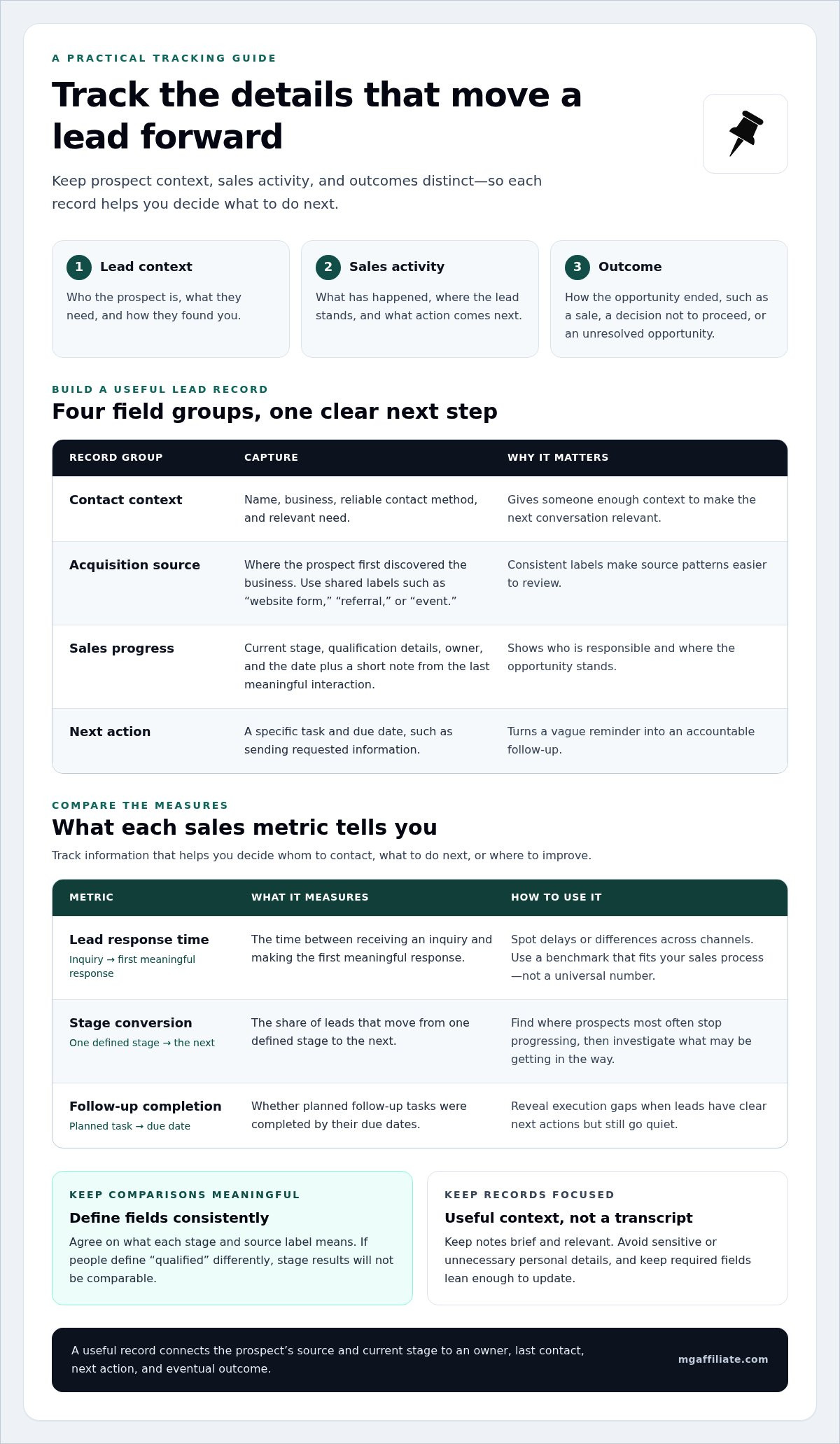
Useful lead tracking separates three kinds of information: who the prospect is and how they found you, what has happened during the sales process, and how the opportunity ended. Keeping these categories distinct helps you understand both the context behind a lead and the actions that moved it forward. The aim isn’t to collect everything. Track information that helps you decide whom to contact, what to do next, or where to improve.
Which fields make lead records useful?
Organize fields into four practical groups. Contact context can include a name, business, and relevant need. Acquisition source records where the prospect first discovered you. Sales progress captures qualification details and current stage. Next-action fields identify the responsible owner, task, and due date. Keep interaction notes focused on useful context rather than a transcript of every conversation.
Choose a short, shared list of source labels and apply it consistently. For example, decide whether to record a social inquiry as “social media” or by a specific platform. Don’t let each person invent a different variation. Avoid storing sensitive or unnecessary personal details. A lead record should support a relevant sales conversation, not become a repository for information you don’t need.
Which lead-tracking metrics help you make decisions?
Metrics turn individual records into patterns, but their definitions need to stay stable. Consistent field definitions make comparisons more meaningful: if one person counts a lead as qualified at first contact while another does so after a needs discussion, their stage results won’t be comparable.
- Lead response time is the time between receiving an inquiry and making the first meaningful response. Review it to spot delays or differences across channels. The useful benchmark is one that fits your sales process, not a universal number.
- Stage conversion is the share of leads that move from one defined stage to the next. Compare stages to find where prospects most often stop progressing, then investigate what may be getting in the way.
- Follow-up completion shows whether planned follow-up tasks were completed by their due dates. It can reveal execution gaps, especially when leads have clear next actions but still go quiet.
- Source-to-sale tracking connects the original acquisition source to qualified conversations and final sales outcomes. Compare results, not just inquiry counts: a channel that brings in more names may produce fewer suitable prospects or customers.
For context on how customer and prospect information can be organized within a broader relationship-management approach, read Understanding CRM for Lead Tracking. Choose metrics tied to a real decision. If a number won’t change how you prioritize, follow up, or assess an offer, it may be reporting noise. For entrepreneurs using prospect feedback to sharpen offer fit, the Make More Offers Challenge offers a related learning path focused on crafting offers.
Spreadsheet or CRM: Which Lead-Tracking Method Fits Your Sales Process?
The right tool is the one your team can keep accurate and use to move prospects forward. A spreadsheet may suit a straightforward process with one owner and a manageable number of active conversations. A CRM can help when several people need a shared history, reminders, or a clearer pipeline view. Neither option fixes unclear stages or inconsistent updates by itself. To decide how to track sales leads effectively, start with the work your process needs to support, not the longest feature list.
Compare the options against your daily workflow:
| Consideration | Spreadsheet | CRM |
|---|---|---|
| Setup effort | Usually quick to shape around a simple process. | Requires configuration of fields, stages, and access. |
| Visibility | Shared views can work, but edits and handoffs need care. | Often provides a central record and pipeline view for a team. |
| Automation | Typically limited or handled separately. | May support reminders and workflow automation, depending on setup. |
| Common limitation | Duplicates, version confusion, and manual reporting can build up. | Extra features and upkeep can add complexity if they don’t solve a real need. |
When can a spreadsheet be enough for lead tracking?
A spreadsheet can be a practical starting point when the process is simple, the team is small, and everyone can access the same current file. Agree on required fields, who owns each lead, and when records should be updated. Use filters or a shared view to surface overdue next steps. If people create separate copies, enter duplicate prospects, or lose track during handoffs, the method may be under strain.
When does a CRM become useful?
A CRM becomes more useful when several people contribute to the same sales process and need a dependable interaction history. Shared pipeline views can clarify responsibility, reminders can make follow-up easier to manage, and integrations may reduce repeated data entry. Each feature should solve a specific problem. Before adopting a system, identify which handoffs, reporting needs, or recurring tasks are difficult to handle with your current approach.
Lead tracking shouldn’t become busywork. Keep only the fields and steps that help someone make a decision or take action. If updating a record means duplicating notes across tools, simplify the workflow or connect the tools where practical. If a CRM demands upkeep without improving visibility or follow-through, reconsider the setup. A lean process people actually use beats a sophisticated system filled with stale records.
Choose based on lead volume, team size, collaboration, reporting needs, and process complexity, then review whether the tool is helping. Ask practical questions: Can the team identify who owns an opportunity? Can someone pick up a conversation with enough context? Can you see which tasks are due? The answers matter more than the software category. A strong foundation combines consistent use, clear responsibility, and records that support the next decision.
How to Build a Repeatable Lead-Tracking Workflow
A reliable workflow makes the next move clear, whoever is handling the lead. Keep it simple enough to use during a busy day, but complete enough to show how a prospect moved from first contact to a final outcome. Use this setup sequence to track sales leads effectively:
- Define a qualified lead. Agree on observable signs that a prospect is worth active follow-up, such as a relevant need or fit with your offer. Write down the criteria so the team applies them consistently.
- Capture the lead and source. Create one record when a prospect enters your process. Use the agreed source label and remove or merge duplicates so activity stays connected to the right person.
- Set stages and ownership. Choose stages that reflect real actions or decisions, then assign one accountable owner to every active lead. If responsibility changes, record the handoff and new owner.
- Log meaningful interactions. After a substantive call, email, or meeting, note the date and useful context. Update the lead’s stage if the interaction meets the criteria for moving forward.
- Assign the next action and due date. Each record update should leave a clear next step, such as answering a question or arranging a follow-up conversation. If no action is needed, record why.
- Review outcomes and refine. Mark whether the lead became a customer, declined, or remains unresolved. Review patterns in the records and adjust your process when the evidence points to a consistent gap.
How do you set up lead stages and ownership?
Make each stage describe something a teammate can verify, not a feeling like “promising” or “nearly ready.” For example, a stage might require that the prospect has discussed a need or received a proposal. Define what must happen before a lead advances. Keep one accountable owner per active record. If work is shared, document who owns the next step and when responsibility transfers.
How do you keep follow-ups consistent without adding busywork?
Use a simple rule: after every meaningful interaction, record the result and either enter a specific next action with its due date or close the loop with a reason. Reminders or a shared view of overdue tasks can surface work without constant manual searching. Fit reviews around your sales activity, such as checking open actions during regular pipeline work, rather than imposing an arbitrary universal schedule.
During reviews, look for inactive records that need a decision, duplicates that should be combined, and closed leads missing an outcome reason. A short reason such as “timing changed” or “offer wasn’t a fit” creates more useful learning than simply marking a record closed. Limit access to people who need the information, collect only necessary data, and follow applicable privacy rules.
Use documented outcomes to better understand prospect needs and where your offer may fit. If you’re also working to strengthen the offers behind your sales conversations, explore the Make More Offers Challenge, an educational resource focused on crafting offers.
Turn Lead-Tracking Insights Into Better Offer Decisions
A lead record becomes more valuable when it helps you learn what prospects need and how they respond to your offer. Review patterns across four dimensions: where leads came from, what they were looking for, how far they progressed, and how each opportunity ended. Don’t make a sweeping change after one conversation. Use patterns to identify a useful question and investigate it carefully.
How can lead outcomes reveal offer friction?
Look for repeated signals. Do prospects from one source often ask for the same clarification? Are conversations stalling at the same stage? Do lost opportunities mention unclear expectations, a mismatch with their needs, or a concern that wasn’t addressed? These observations can point to friction in your messaging or sales conversation, but they don’t prove its cause.
Compare similar leads across sources and stages before changing your approach. If prospects from several channels raise the same question, the issue may be how the offer is explained. If it appears mainly among leads with a particular need, the fit may be less clear for that group. Treat each pattern as a prompt to investigate, not a verdict. Small samples, missing outcomes, or inconsistent stage definitions can make apparent trends misleading.
What should you do with the patterns you find?
Choose one question at a time. For example: “Do prospects understand what’s included before the offer is presented?” Record the current wording or conversation approach, make one focused adjustment, then observe relevant leads using the same stage and outcome definitions. Note the period you’re reviewing and what you see. This won’t establish causation on its own, but it can help you decide what to examine next.
Use prospect language to make explanations more specific. If people repeatedly ask what problem an offer addresses, clarify that point. If expectations seem misaligned, explain who the offer is designed for and what it covers. Keep evidence, such as several recorded questions, separate from interpretation, such as assuming a particular phrase caused prospects to disengage.
Offer development and sales conversations are closely connected. If your records suggest that prospects need a clearer explanation of a premium offer, this high-ticket sales guide can help you explore how premium offers are presented. Use lead feedback to decide which parts of your own message deserve attention instead of assuming one approach fits every prospect.
For a structured educational next step, explore the Make More Offers Challenge guide or learn more about the Make More Offers Challenge. The challenge helps entrepreneurs craft offers. Pair that learning with disciplined lead records to get a clearer basis for refining what you communicate and reviewing how prospects respond. Treat changes as something to evaluate, not as guaranteed results.
Put Your Next Insight Into Action
The strongest lead-tracking process is one you keep using and learning from. Choose one question your prospect conversations have raised, then use your records to explore it with curiosity rather than rushing to a conclusion. Small, steady improvements in how you understand buyer needs can give you a clearer foundation for future decisions.
As you refine your sales approach, give equal attention to the offer behind the conversation. The Make More Offers Challenge helps entrepreneurs craft offers, making it a relevant next step if you’re ready to develop that skill. MG Affiliate is owned and operated by Myron Golden Enterprises.
Explore the Make More Offers Challenge to take the next step toward building offers with intention. Keep putting what you learn into practice, and let each conversation sharpen your understanding of your business.
Frequently Asked Questions
How often should you update sales lead records?
A practical part of how to track sales leads effectively is updating records after meaningful interactions or status changes, while details are fresh. Set the rhythm around your sales activity and handoffs: a solo seller may update after each call, while a team may also review records when transferring responsibility. For example, after a prospect requests a proposal, log the interaction, assign the proposal task to its owner, and enter a due date.
Can you track sales leads without a CRM?
Yes. A spreadsheet or another shared system can track leads without a CRM if the process is straightforward and everyone knows who owns each record. Keep the same fields, access permissions, and update habits across the team. Consider changing methods if duplicate entries keep appearing, two people contact the same prospect, handoffs lose context, overdue follow-ups are hard to spot, or compiling a dependable activity report requires repeated manual cleanup.
What is the difference between a lead and a qualified lead?
A lead is someone who may become a buyer or has made an inquiry; a qualified lead is one that meets criteria your business has chosen for fit or readiness. Those criteria should reflect your offer and sales process, such as whether the prospect has the need you address or is evaluating a purchase. Don’t treat a job title, company size, or single interaction as a universal signal of qualification.
How do you measure sales lead response time?
Measure sales lead response time by subtracting the inquiry timestamp from the time of the first meaningful sales reply. Record both dates and times in the same time zone, and distinguish an automated receipt confirmation from a human response if that matters to your process. Compare similar periods and channels using the same rule. Use the measure to identify delays in your process and consider your buyers’ expectations rather than relying on a universal target.
Is lead tracking the same as sales pipeline management?
No. Lead tracking keeps a record of each prospect’s interactions and pending work; sales pipeline management groups active opportunities by their progress toward a decision. They overlap when a prospect becomes an opportunity, but answer different questions: “What happened with this person?” versus “How is the deal moving?” For example, a note can capture that a buyer requested revised terms, while the pipeline stage shows the opportunity is under review.
What should you do with a sales lead that stops responding?
Pause or close a nonresponsive lead according to your follow-up policy, after recording the last interaction and attempts already made. Choose a sensible next step, such as a final message after a relevant interval, then mark the record inactive rather than leaving it indefinitely open. Respect any stated contact preferences and applicable privacy requirements. If the prospect replies later, update the status and resume from the new context.
Leave a Reply