

Customer pain points are recurring frustrations, obstacles, or unmet needs that make it harder for people to choose, use, or stay with a product or service. Using AI to identify customer pain points means analyzing feedback, business records, and public reviews to spot repeated problems and understand their context. The strongest insights come from patterns in the evidence, not from an AI-generated summary alone.
You may already have more clues than you think: support messages, survey responses, sales conversations, and online comments can all show where customers get stuck. The challenge is distinguishing a persistent issue from an isolated complaint without exposing sensitive data or relying on an inaccurate AI conclusion. This guide explains how to gather and analyze useful signals, prioritize important problems, and validate what AI finds before acting. You’ll also learn how to manage privacy and accuracy risks so customer insight can inform better decisions.
Key Takeaways
- Define pain points as recurring obstacles or unmet needs, then connect verified insights to clearer positioning, FAQs, sales materials, and landing pages.
- Protect customer information and treat AI findings as hypotheses; human review helps catch errors, bias, and issues that need urgent attention.
- Bring feedback and business records together to spot recurring problems, then prioritize them by frequency, severity, and business impact.
- Use AI to group messages and surface patterns, but preserve the evidence behind each theme and investigate conflicting accounts.
- Compare public feedback across platforms before acting, and use the patterns you find to make sharper, customer-centered business decisions.
What are customer pain points?
- Define the obstacle through a customer’s experience. A pain point is a recurring problem that makes buying, using, or renewing an offer harder. It might involve cost, complexity, slow service, or uncertainty. For example, a customer may like a product but struggle to understand the setup instructions. Distinguish that obstacle from a general preference, such as wanting more color choices. This helps teams focus on issues that disrupt the customer experience or prevent a desired outcome.
- Map each issue to the customer’s journey. Use a simple sequence: discovery, evaluation, purchase, onboarding, and ongoing support. A prospect who can’t compare plans faces an evaluation barrier; a customer waiting for an answer faces a service problem. Ask sales and support teams what they hear repeatedly, then record the customer’s words and where progress stopped. These conversations provide context that a feedback label alone may miss.
- Compare AI-generated insights with original evidence. Ask AI to group comments into themes, then review the source messages behind each theme. Check whether the examples describe the same problem. For instance, “delivery confusion” could combine unclear tracking with a missed delivery, which need different fixes. Ask a sales or service colleague to review the evidence and note disagreements. Treat each theme as a working insight until customer behavior or direct feedback supports it.
- Turn verified problems into clearer messaging. If prospects repeatedly ask whether setup requires technical skills, address that concern in your positioning, sales materials, FAQs, and landing pages. Answer directly, using language customers recognize. Give sales teams a concise response and the evidence behind it. Then compare customer questions and page behavior after the change. This focuses effort on messages tied to actual barriers, rather than assumptions about what sounds persuasive.
- Use sales conversations to uncover unmet needs. Ask sales representatives to record the prospect’s goal, objection, alternative considered, and reason for delaying or declining. A prospect who chooses a spreadsheet because your software feels difficult reveals a usability concern, not simply a price objection. Pair those notes with customer service themes and follow-up feedback. When several sources point to the same obstacle, teams can prioritize a response and strengthen their positioning without mistaking one unusual comment for broad demand.
Privacy, hallucinations, and over-automation risks
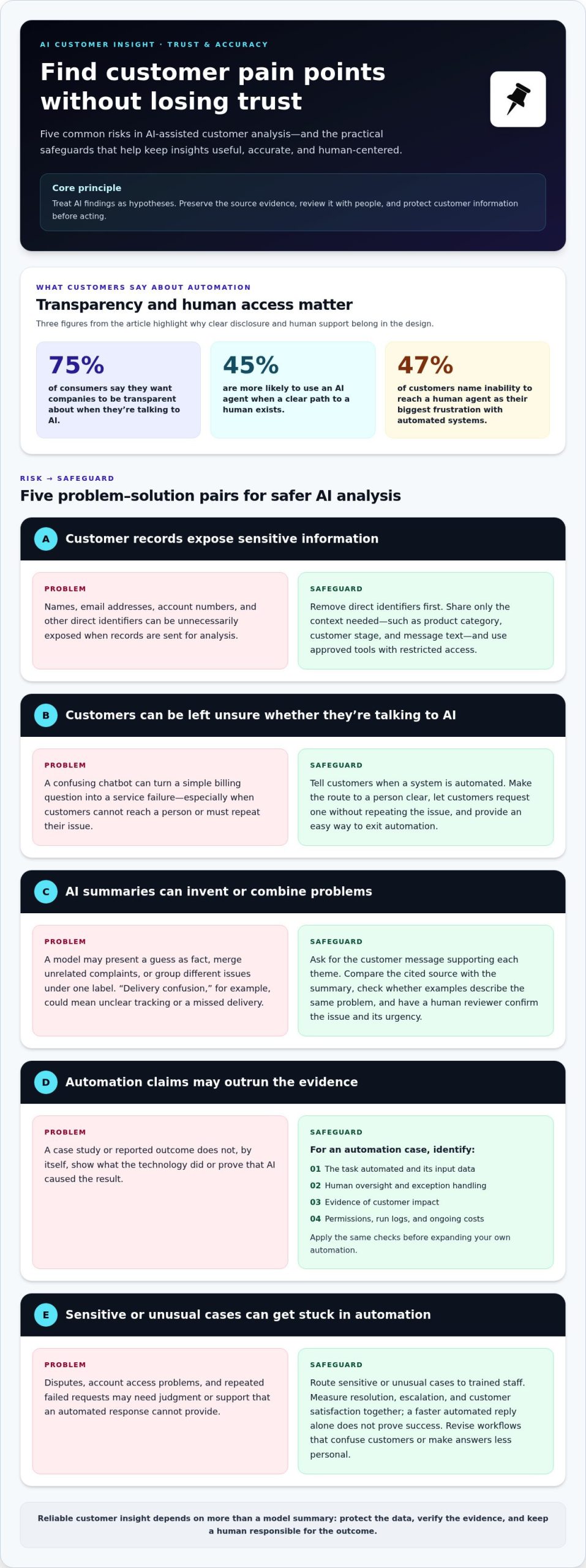
- Limit what you share with AI. Before analyzing customer records, remove names, email addresses, account numbers, and other direct identifiers. Give the model only the context needed to classify a problem, such as product category, customer stage, and message text. For example, replace a named account with “enterprise buyer” before asking AI to group onboarding complaints. Restrict access and use approved tools for customer information. These steps reduce unnecessary exposure while preserving enough detail to interpret customer behavior.
- Make AI interactions visible and easy to exit. Tell customers when an automated system is responding, and provide a clear route to a person. Seventy-five percent of consumers say they want companies to be transparent about when they’re talking to AI, while 45% are more likely to use an AI agent when a clear path to a human exists. A confusing chatbot can turn a simple billing question into a service failure. Let customers request a person without repeating their issue.
- Test claims against the original evidence. AI can invent details, merge unrelated complaints, or present a guess as fact. Ask it to cite the customer message supporting each theme, then compare the cited text with the output. If a summary says “customers can’t cancel,” check whether the source describes cancellation or a separate account problem. Have a human reviewer confirm the issue and its urgency. Track corrections to help the team spot recurring model errors.
- Evaluate automation with a real case, not a headline. When reviewing a Hyundai AI automation case study, separate documented outcomes from assumptions about what the technology did. Identify the task automated, its input data, human oversight, exceptions, and evidence of customer impact. Don’t attribute a result to AI without evidence linking the system to that change. Apply the same discipline to your own process: test permissions, exception handling, run logs, and ongoing costs before expanding automation.
- Keep a human responsible for sensitive or unusual cases. Route disputes, account access problems, and repeated failed requests to trained staff. Forty-seven percent of customers name the inability to reach a human agent as their biggest frustration with automated systems. Measure resolution, escalation, and customer satisfaction together; a faster automated reply alone doesn’t prove success. If automation makes an answer less personalized or leaves customers confused, revise the workflow. For a more deliberate approach to business offers, explore structured offer-building strategies.
Using customer feedback and business data to identify pain points
AI tools can quickly organize large collections of feedback; manual research adds context, while traditional analytics tracks measurable behavior. Combine all three to distinguish recurring customer problems from isolated comments.
-
Find Unfiltered Customer Feedback
Search public review pages, community discussions, and social posts for customers describing real experiences. Browser search tools can surface phrases such as “couldn’t set up” or “still waiting,” while manual searches help uncover context. Review source posts rather than relying on snippets, and note the date, product, and customer situation. Don’t treat a polished testimonial or a single angry comment as a complete picture. Look for repeated descriptions of the same difficult moment.
-
Centralize Customer Feedback Data
Bring customer reviews, NPS feedback, support logs, and sales call notes from the last 90 days into a shared workspace. Add chats, CRM records, surveys, and social feedback when available. Keep each item’s source, date, customer journey stage, and resolution status attached. A unified customer service dashboard can provide a 360-degree view, helping teams compare reports across touchpoints. Remove duplicate messages and keep the original text, so AI summaries remain traceable to actual feedback.
-
Compare AI Tools with Manual Research and Analytics
Use AI to cluster open-ended comments and summarize recurring themes, then compare its output with manual interviews and traditional analytics. Analytics can show where customers abandon a process; interviews can explain why that step feels difficult. AI can scan large collections quickly, but it may misclassify sarcasm or combine distinct issues. Ask a reviewer to inspect source messages and test themes against observed behavior. Use each method for its strengths, rather than treating any single output as definitive.
-
Close the Customer Feedback Loop
Assign an owner to each priority issue, record the action taken, and tell affected customers what changed. For example, if support messages reveal confusing setup instructions, update the guide and explain the improvement in a follow-up. Track whether the same feedback continues and whether resolution becomes easier. Share the result with customer support, sales, and product teams. This creates a visible cycle of listening, action, and learning that can support customer trust and business growth.
AI-assisted sorting, summarization, and pattern discovery
Turn customer messages into traceable themes, then use frequency and sentiment to decide what deserves attention.
- Set a consistent labeling system. Before sorting comments, define categories such as onboarding, billing, product usability, delivery, and support. Give the AI examples of what belongs in each category, including borderline cases. A message saying “I couldn’t find the invoice” may concern billing access, while “the charge looks wrong” signals a billing dispute. Consistent labels make comparisons across teams and channels more useful and help prevent one issue from appearing under several names.
- Ask natural language processing to group recurring issues. NLP can extract key themes from thousands of customer messages, helping teams find repeated friction without reading every message individually. Ask it to return each theme, representative customer wording, frequency, and sentiment. For example, “setup instructions skip a step” and “the guide doesn’t explain activation” may indicate the same onboarding obstacle. Keep the customer’s original phrasing alongside the label so a summary doesn’t erase important distinctions.
- Summarize large collections in manageable batches. Divide feedback by channel, product, or customer journey stage before requesting summaries. A multi-stage prompt can deliver results in chunks, allowing you to refine the next request based on what the previous batch revealed. Start with recurring topics, then ask for examples and exceptions. If a batch shows negative comments about delivery communication, examine the source messages before treating that theme as a broad pattern across all customers.
- Measure themes by frequency and sentiment together. Ask the AI to show how often each issue appears and whether its language is neutral, positive, or negative. A frequently mentioned minor inconvenience may call for a different response than a less frequent complaint involving failed payment. Compare themes across customer groups and time periods, and preserve conflicting accounts. Some customers may praise a feature while others describe difficulty using it. That contrast can reveal a design or expectation gap.
- Convert discovered patterns into a ranked action list. Combine frequency and sentiment severity with business impact, then assign an owner to each priority. Ask the AI to show the evidence behind its ranking rather than simply deliver a final score. A rise in “can’t reset password” messages could point to access friction; confirm the pattern against support records before changing the process. Track whether the theme recurs after the change, and update categories when new customer language reveals a different issue.
Online reviews and competitor monitoring
Public comments reveal customer expectations, frustrations, and friction across products and channels. Analyze repeated themes across platforms before changing your strategy.
- Choose public sources customers use. Search Reddit, product review sites, YouTube, and TikTok for comments about your category. Use product names alongside phrases such as “hard to use,” “confusing,” or “wish it had.” Review the full post and its replies, not just search snippets. A complaint about setup may describe unclear instructions, missing features, or an unmet expectation. Record the issue the customer actually describes.
- Separate your reviews from competitor feedback. Group comments by company, product, and customer journey stage. For example, compare complaints about checkout with comments about delivery or ongoing support. Competitor reviews can reveal unmet expectations, but they don’t prove your customers share those frustrations. Treat them as questions to investigate, then compare them with your own feedback and customer behavior before adopting a new strategy.
- Ask AI to extract themes and supporting examples. Give the tool a clear task: group public comments by problem, quote representative language, and identify the source platform. Ask it to distinguish a product limitation from a service delay or confusing policy. Keep each theme connected to its original post. This makes it easier to spot inaccurate summaries and understand how customers describe friction in their own words.
- Check patterns across platforms. Compare each AI-generated theme with feedback from multiple sources, such as Reddit threads, product reviews, and YouTube comments. Look for recurrence and urgency, not just strong wording. A heated comment may represent one person’s experience; similar reports across channels may point to a broader obstacle. Check whether customers describe the same situation and outcome before combining comments into one pain point.
- Prioritize problems you can act on. Rank verified themes by frequency, urgency, and relevance to customer needs. If customers repeatedly describe confusing setup, investigate whether instructions, onboarding, or product design create the obstacle. Decide which team owns the next step, then monitor later feedback for signs of change. Use competitor observations to sharpen your approach, not to copy another company’s response without evidence that it fits your customers.
MG Affiliate: BOSS Moves Book
MG Affiliate’s BOSS Moves Book is a next step for readers ready to turn customer insight into focused business action. After identifying recurring frustrations, use the evidence to clarify which customer problem your offer addresses and how you communicate that value. The book can support your broader learning as you build confidence in making decisions and moving ideas forward. It isn’t an AI analysis tool, so use the customer evidence and validation process from this guide to shape your strategy. For additional business learning, MG Affiliate also offers From Trash Man to Cash Man Book, The B.E.S.T. Wealth Network, and Click and Sell Almost Anything. Explore the BOSS Moves Book and related offerings at mgaffiliate.com.
Turn Customer Understanding Into Your Next Move
Customer insight becomes valuable when it changes a decision. Choose one issue supported by your evidence, decide what action it calls for, and define how you’ll tell whether the customer experience improves. Keep the original customer perspective in view as you make the change. This discipline keeps using AI to identify customer pain points connected to real needs, rather than letting a polished analysis become the strategy by itself.
Then build your next business move around what customers are actually telling you. MG Affiliate offers the BOSS Moves Book along with a variety of valuable resources for readers exploring business learning and tailored offers. Consider which path fits the progress you want to make, and keep your customer evidence at the center of your decisions.
Contact MG Affiliate to discuss your goals. Take the next step with clarity, purpose, and confidence.
Frequently Asked Questions
What’s a simple way to get started with AI-powered analysis?
Start with one decision, such as why trial users stop before completing setup. Select a manageable batch of relevant messages, remove personal identifiers, and ask an AI tool to group the main obstacles. Request sample comments to support each theme, then review them yourself. This focused test helps you assess whether the output is useful before introducing more data or using the findings to change a customer-facing process.
How can AI identify customer pain points from customer feedback?
AI can examine wording, classify topics, and detect language linked to confusion, dissatisfaction, or unmet expectations. For example, it may connect “I couldn’t find the export button” with “saving my report takes too long” under a broader usability theme. Ask the system to distinguish the shared obstacle from the specific context of each comment. That detail helps teams choose a response that addresses the underlying issue rather than repeating the same generic fix.
What types of customer data can AI analyze to find pain points?
AI can analyze text from surveys, customer support conversations, review comments, sales notes, and open-ended form responses. It can also work with structured records, such as product usage events or support categories, when those records are organized and relevant. Combining both types may reveal that customers who mention a confusing feature also leave a particular workflow early. Limit analysis to data that serves a clear business question.
Which AI tools are best for analyzing customer reviews, surveys, and support tickets?
The best fit depends on your data sources and how your team will use the findings. Look for tools that can process your formats, separate topics and sentiment, show source text, and let reviewers correct labels. For a small review collection, a general text-analysis tool may be enough. Teams handling support tickets may need stronger access controls and a workflow that preserves the original ticket context.
How accurate is AI at detecting customer pain points, and how can accuracy be measured?
Accuracy varies with feedback quality, the clarity of your categories, and the context supplied to the AI. Compare its labels with a human-reviewed set of messages, noting both correctly identified issues and missed or incorrectly assigned themes. Check whether results remain consistent across channels and customer groups. Accuracy matters most when measured against the decisions you need to make, not just the fluency of a summary.
What steps should businesses follow to use AI for customer pain point analysis?
Begin with a specific business question, then choose relevant customer records and establish clear issue labels. Prepare the data, ask the AI for evidence-linked themes, and have a reviewer assess ambiguous examples. Next, compare the findings with customer behavior and select an issue with a clear owner. For example, a team investigating checkout exits can test whether a proposed change addresses the obstacle customers describe.
What are the risks and limitations of using AI to identify customer pain points?
AI may mistake sarcasm for praise, overlook problems expressed in unfamiliar language, or overemphasize feedback from a vocal group. It can also produce confident explanations that the underlying messages don’t support. Privacy concerns arise if sensitive information is entered into an unsuitable system. Reduce these risks by limiting data access, reviewing source evidence, and checking whether quieter or less-represented customer groups appear in the analysis.
How can businesses validate AI-identified pain points and turn them into product improvements?
Test a proposed pain point against customer interviews, usage patterns, and examples from the original feedback. Then define a small product change tied to the obstacle, such as clarifying a label customers misunderstand. Track a relevant outcome, such as completion of the affected task, and gather follow-up comments. If the problem persists, revisit the diagnosis before expanding the change across the product.
Leave a Reply