

What if AI could help you change a landing page faster, but couldn’t tell you which change deserves to stay? That’s the key to how to optimize a landing page with AI: use it to speed up the work, then let audience insight and performance data guide your decisions.
It’s reasonable to be cautious. AI can produce polished copy and layouts in seconds, but a page can still feel generic, miss what your audience cares about, or dress up an unclear offer. The goal isn’t to hand over your strategy. It’s to turn scattered research into sharper messaging and make focused changes you can actually evaluate.
This guide gives you a repeatable workflow for improving an existing landing page. You’ll learn where AI can help with research, copy, and design, how to choose tools and review their output, and how to test one meaningful change at a time. Most importantly, you’ll keep decisions grounded in real visitor behavior and a clear, valuable offer, so faster iteration leads to useful learning, not just more variations.
Key Takeaways
- Learn how to optimize a landing page with AI by setting a clear conversion goal before generating copy, layouts, or test ideas.
- Use AI to organize audience research and create focused page variations, then compare tools based on the job each needs to do.
- Review every AI-generated change for accuracy, audience fit, clarity, accessibility, and mobile usability before publishing.
- Test changes in a controlled way and use the results to guide your next iteration without assuming one change caused every outcome.
- Strengthen the offer behind the page: AI can improve how you present its value, but it can’t replace a clear, relevant offer.
What Does It Mean to Optimize a Landing Page with AI?
Generating a landing page and optimizing one are different jobs. A generator can turn a prompt into a fresh layout and draft copy. Optimization starts with a page that already exists, a specific conversion goal, and a question about what may be stopping visitors from taking the next step. AI can help investigate and develop changes, but the aim is to improve the page based on evidence, not simply produce more versions.
AI-assisted landing page optimization uses AI to research, create, review, and test page improvements against a defined goal, then uses real audience and performance evidence to guide what happens next. That distinction matters. AI can summarize research you provide, suggest explanations for observed behavior, and draft alternatives. It can’t establish what your audience truly needs just because its response sounds confident. Use it as a capable assistant, not the authority on your market. For a broader view of how AI supports marketing tasks such as personalization and understanding customer behavior, see Artificial intelligence in marketing.
For example, if visitors reach a sales page but hesitate before clicking the CTA, AI might help generate clearer button wording or identify questions left unanswered in the customer feedback you provide. Those are hypotheses, not proven fixes. You still need to decide which change fits the offer and test whether the page performs differently.
Which Landing Page Elements Can AI Help Improve?
Give AI your existing page, relevant audience research, and a clear task. It can summarize recurring customer questions and draft testable alternatives for the headline, supporting copy, CTA wording, page structure, or image concepts. For instance, ask it to create headline options that address a specific concern without adding claims that aren’t in your source material.
AI is useful for drafting and analysis, not for making the final strategic call. Choose which message reflects the offer, which proof is appropriate, and which alternative deserves a test. Tie each suggestion to a reason you can explain, such as a repeated question in customer interviews or a point of confusion in page feedback.
What AI Cannot Know Without Useful Inputs
Vague prompts produce vague pages. “Write a high-converting landing page” doesn’t tell AI who the audience is, what they value, what the offer includes, or what action the page should drive. Supply those essentials, along with relevant customer language and page context, so its suggestions have something real to work from.
Then review every generated claim before it reaches a visitor. Check accuracy against the actual offer, confirm testimonials are authentic and used appropriately, and make sure performance promises are substantiated. AI can refine how an offer is presented, but it can’t supply the offer’s value or replace your responsibility for what the page says.
How to Use AI Across the Landing Page Optimization Workflow
A reliable workflow gives AI a clear job at every stage, from organizing customer feedback to helping you interpret test results. Keep the process focused: make one meaningful change, measure it against a defined goal, and use what you learn to decide what to try next.
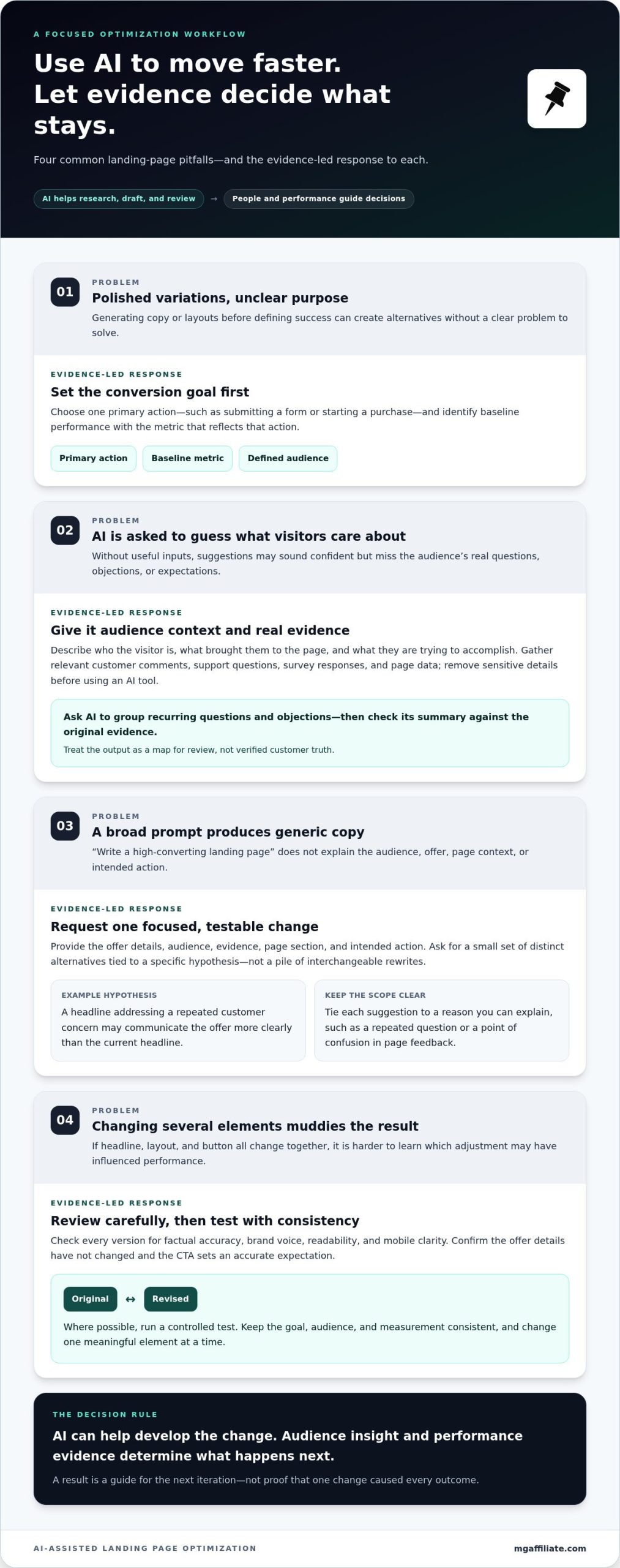
Optimization begins with a measurable goal, not a prompt. Decide what success means before asking AI to write a headline or suggest a new layout. Otherwise, you may create polished alternatives without knowing which problem they’re meant to solve.
Prepare the Goal, Audience, and Evidence
Start by naming the primary action you want visitors to take, such as submitting a form or starting a purchase. Define the audience and traffic source too, since visitors arriving from different campaigns may have different expectations. Then gather customer questions, objections, feedback, and existing page performance. Ask AI to sort this material into themes, but check each summary against the original evidence.
- Set the measurement. Choose one primary conversion goal and identify the page’s baseline performance using the metric that reflects that action.
- Describe the visitor. Note who the page is for, what brought them there, and what they’re likely trying to accomplish.
- Collect evidence. Bring together relevant customer comments, support questions, survey responses, and page data. Remove sensitive details before using an AI tool.
- Ask for synthesis. Have AI group recurring objections or questions and flag themes that appear more than once. Treat the output as a map for your review, not verified customer truth.
Generate and Refine One Focused Page Change
Give AI the offer details, audience, evidence, page section, and intended action. Ask for a small set of distinct alternatives tied to a specific hypothesis, not a pile of interchangeable rewrites. For example, test whether a headline that addresses a repeated customer concern communicates the offer more clearly than the current headline. Keep other page elements stable so the test can answer that question.
Before publishing, review each version for factual accuracy, brand voice, readability, and mobile clarity. Confirm that the offer details haven’t changed and that the CTA sets an accurate expectation. Choose the alternative that best reflects the evidence, then run a controlled test where possible. Avoid changing the headline, layout, and button together if you want to learn which adjustment may have influenced the result.
- Launch the test. Keep the goal, audience, and measurement consistent across the original and revised page.
- Review the results. Compare performance against your baseline and check whether the result is clear enough to inform a decision. If the evidence is inconclusive, don’t force a winner.
- Record the learning. Note what changed, what happened, and what you’ll investigate next. A result can guide your next hypothesis without proving why every visitor behaved as they did.
Use this process to make how to optimize a landing page with AI a repeatable practice, not a one-off prompt. If offer clarity is the issue you’re investigating, the Make More Offers Challenge is an educational resource focused on helping entrepreneurs craft offers.
How to Compare AI Landing Page Tools and Test Changes
There isn’t one best AI landing page tool for every job. Some tools help generate a page from a prompt; others support design and editing, analyze visitor behavior, or run controlled experiments. Choose based on the work your page needs, not how much AI a platform claims to include. A polished draft can speed up production, but it can’t tell you whether a change improves results.
Choose a Workflow That Fits the Optimization Task
Match the tool category to the task. Landingi represents a page-generator approach, while Figma is useful to consider as a design and prototyping environment. Neither category alone answers every optimization question. Before choosing, assess the capability you need, how well the tool fits your existing workflow, how easy it is to use, and whether it supports the measurement required to learn from changes.
Use this comparison to identify the job you need done. One platform may cover several roles, but don’t assume that generating or viewing a page also validates its effectiveness.
| Tool category | What it can help with | What it cannot prove |
|---|---|---|
| Page generation | Drafting page structure and initial copy from a supplied brief. | Whether the brief reflects audience needs or the resulting page will perform better. |
| Design and editing | Exploring layouts, refining page elements, and reviewing how a design may appear across screen sizes. | Whether visitors understand the offer or prefer one design over another. |
| Analytics | Seeing how visitors interact with a page and where they may drop off. | Why a visitor behaved a certain way or whether one page change caused a shift. |
| Controlled testing | Comparing versions against a defined metric and audience. | Results that apply to every audience or explain the underlying reason for a difference. |
Set Up a Test That Can Teach You Something
Write down your hypothesis before launching a test: “Changing the CTA to clarify the next step may increase form submissions.” Choose the success metric and audience segment in advance, then change one meaningful variable at a time when practical. If you alter the headline, offer details, and layout together, the result won’t show which adjustment mattered.
Give the test enough traffic and time to produce useful evidence, without treating an arbitrary early fluctuation as a winner. Low traffic can leave results inconclusive, and inconsistent audience groups can muddy the comparison. If the signal is mixed, keep the current version or gather more evidence rather than claiming a win. Record what you tested and what the data can support. That discipline is central to how to optimize a landing page with AI: tools help you move faster, while sound measurement keeps your decisions grounded.
How to Review AI Landing Page Changes Before Publishing
AI can make a page look polished before it’s ready to meet real customers. A human review catches errors and trust issues before publication; performance measurement comes later, after visitors have interacted with the page. Keep those jobs separate. First decide whether the page is accurate, clear, and usable. Then use data to assess how it performs.
Verify every claim before a generated page goes live. That rule protects both your audience and the credibility of your offer. Use this checklist to review the page deliberately, not just for typos.
Check Accuracy, Trust, and Offer Alignment
Compare every factual statement with the actual offer and its supporting evidence. AI may add details, benefits, timelines, guarantees, or outcomes that sound persuasive but weren’t provided in your prompt. Remove anything you can’t substantiate. Treat testimonials with the same care: use authentic customer statements, preserve their meaning, and don’t imply results beyond what the person actually described.
- Verify the offer. Confirm that product or service details, terms, and any stated guarantee match what’s genuinely provided.
- Check claims and proof. Make sure conversion, performance, or customer outcome claims have a reliable basis. Remove invented urgency, unsupported numbers, and proof that can’t be verified.
- Align the message. The headline should set an expectation the supporting copy fulfills, and the CTA should describe the next step visitors will actually take.
- Read for audience fit. Replace generic promises with clear language that reflects the audience’s real needs and the offer’s actual value.
Ask a simple question as you review: would a reasonable visitor interpret this copy differently from what the business delivers? If so, revise it before publishing. Trust depends on the whole message matching, not just an accurate headline.
Check Usability Before Sending Traffic
Review the page on a phone as well as a larger screen. Check that the headline and primary CTA are easy to find, text is readable without awkward zooming, and important content isn’t hidden or crowded. Confirm that the form asks only for information that makes sense for the next step, and that its labels and instructions are clear.
- Check text and button contrast, readable font sizes, and descriptive labels that make the CTA’s purpose clear.
- Test links, form submission, error messages, and the confirmation experience from a visitor’s perspective.
- Make sure the page’s visual hierarchy guides attention naturally toward the offer and intended action.
Human review answers, “Is this page accurate and ready to use?” Measurement answers, “How did visitors respond?” Don’t use a later test result to excuse an avoidable factual or usability problem. If you’re strengthening the offer behind your page, explore resources for crafting a stronger offer. This review is a practical safeguard in how to optimize a landing page with AI, keeping speed in service of clarity and trust.
Turn AI Landing Page Insights into Stronger Offers and Next Steps
A test result isn’t the finish line. It’s new evidence for deciding what to examine next. Use AI to summarize patterns or help draft a follow-up hypothesis, but keep your interpretation proportional to what the data can show. A change that performs differently during a test may be associated with that result; it doesn’t automatically explain why visitors responded as they did.
Interpret Results and Choose the Next Iteration
Start with the hypothesis and conversion metric you chose before the test. Did the result move in the direction you expected? Was the difference clear enough to guide a decision, or could normal variation explain it? Compare like with like, and avoid turning an uncertain result into a confident claim about visitor preferences.
Build a simple record for each test. Capture the original hypothesis, the page change, the audience, the test period, the chosen metric, and the outcome. Add a short note about what the result can and can’t support. This makes past learning easier to use when you plan a later page iteration and helps prevent the same untested assumption from returning in a new headline or CTA.
If the result is inconclusive, that’s still useful information. It may mean you need more evidence, a clearer hypothesis, or a more focused change. Don’t label a variation the winner simply because it looks more polished or because you hoped it would perform better. Decide whether to keep the existing page, gather more data, or investigate a different friction point.
Strengthen the Offer Behind the Page
What if the page is clear, but the offer still doesn’t feel relevant or valuable to the people it’s meant to serve? Sharper copy can make an offer easier to understand, but it can’t create genuine value or fix a mismatch between the offer and the audience. Before rewriting the page again, ask whether visitors can quickly understand what’s offered, who it’s for, and why it matters to them.
Use that question to guide the next iteration. If feedback points to confusion about what’s included, clarify the offer details. If visitors understand the offer but don’t see its relevance, revisit the audience fit and the value being communicated. AI can help you organize those observations and explore alternative explanations, but the evidence and the actual offer must remain the foundation.
That’s the practical discipline behind how to optimize a landing page with AI: use AI to accelerate analysis and presentation, then let credible evidence and a strong offer shape your next decision. If you want to build your offer-crafting skills, explore the Make More Offers Challenge, a recurring five-day virtual business intensive focused on creating offers.
Make Your Next Page Decision Count
Your next step doesn’t need to be a complete redesign. Choose one page decision worth improving, connect it to what you’ve learned about your audience, and keep a record of what you try. That steady discipline turns how to optimize a landing page with AI into an ongoing practice of making clearer, more informed choices.
As you refine the page, keep the offer itself in view. Stronger wording can help people understand its value, but the offer still needs to fit the audience and deliver on the expectations your page creates. MG Affiliate’s educational resources focus on offer creation and business performance.
Explore the Make More Offers Challenge to build your offer-crafting skills. You bring the insight about your audience; AI can help you explore how to express it. Keep learning, keep testing thoughtfully, and move forward with confidence.
Frequently Asked Questions
Can AI optimize an existing landing page?
Yes. AI can help assess an existing page by summarizing its copy, identifying possible gaps, or suggesting alternatives for a specific section. For example, you could ask it to compare the page’s headline with common questions from customer interviews. Treat its observations as ideas to investigate, not confirmed explanations. Check suggestions against your visitor data and audience knowledge, then decide which change is relevant enough to evaluate.
How do I write an AI prompt for landing page optimization?
Give the AI context and a defined task. Include the audience, offer details, traffic source, page section, and the action visitors should take. Add real customer language when you can, and state what the copy must not claim. For example: “Suggest three concise headline options for first-time buyers who are concerned about setup. Use only the offer details below, and don’t promise a specific result.” Review each option before using it.
Which AI tools can help optimize a landing page?
The right tool depends on the task. Page builders can support page creation, design environments help shape layouts, analytics tools report visitor behavior, and experimentation platforms compare versions. Some products combine several functions, but a feature list alone won’t show whether a tool fits your process. Decide what you need to do first, then assess usability, measurement capabilities, and fit with your current workflow.
Can AI improve landing page conversion rates?
AI may help you develop and evaluate page changes, but it can’t guarantee a conversion lift. Results depend on factors such as audience fit, offer value, traffic quality, and the page experience. If an AI rewrite improves clicks but leads to fewer qualified inquiries, more clicks may not mean better performance. Define what counts as a valuable conversion for your business, and assess that outcome rather than relying on a broad promise.
How do I A/B test AI-generated landing page copy?
Choose one copy element to compare, such as the headline, and keep the rest of the page consistent so the comparison stays focused. Split the same eligible audience between the original and revised versions, and track the metric tied to the page’s goal. Check that tracking works before launch. If traffic is limited or the test ends with an unclear result, report it as inconclusive rather than treating one version as a winner.
What should I check before publishing AI-generated landing page content?
Confirm that names, product details, terms, testimonials, and any stated results are accurate and supported. Check that the page doesn’t contain confidential information you didn’t intend to share with an AI tool. Then preview the live page, not just the editor: submit the form, follow the confirmation flow, and inspect the page on a phone. These checks can catch publishing or tracking issues that a copy review won’t reveal.
Does AI replace landing page copywriters or marketers?
No. AI can help with repetitive drafting, organizing research, or producing alternatives, but people still need to decide what the audience needs, what the offer can genuinely deliver, and which evidence supports a message. A copywriter or marketer can also judge whether language fits the brand and make strategic trade-offs that a prompt may not capture. Use AI to extend the team’s capacity, not to remove human accountability.
Leave a Reply