

Manual selling isn’t the enemy; repetitive work is the bottleneck. Automating the sales process for a small business means using software to track leads and deals, score prospects based on their interactions, and trigger follow-ups or routine admin tasks. People still bring the judgment, trust, and personal conversations that turn prospects into customers.
If you’re juggling sales alongside everything else, it’s reasonable to worry that automation will add complexity or make customer interactions feel impersonal. The right workflows do the opposite: they take routine steps off your plate and help you focus attention where it matters. Automation works best when it supports your process, not when it tries to replace the human side of selling.
This guide explains how sales automation works, compares automated and manual processes, and explores tools for managing customer relationships, email, social media, scheduling, support, and reporting. You’ll also learn how to choose a practical starting point and build a system that fits your small business, rather than adopting technology for its own sake.
Key Takeaways
- Automate repeatable steps such as lead tracking, prioritization, and follow-up, while keeping human judgment central to sales conversations.
- Choose CRM, email, analytics, and social tools that share information, so customer context and sales outcomes stay connected.
- Use automated support and scheduling to handle common inquiries and make booking or changing appointments easier for customers.
- Turn reporting and forecasting into practical decisions by tracking sales activity, spotting bottlenecks, and identifying effective tactics.
- Compare the time and consistency of automated tasks with the personal attention of manual selling, then automate the work that frees your team to focus on customers.
1. What is sales automation?
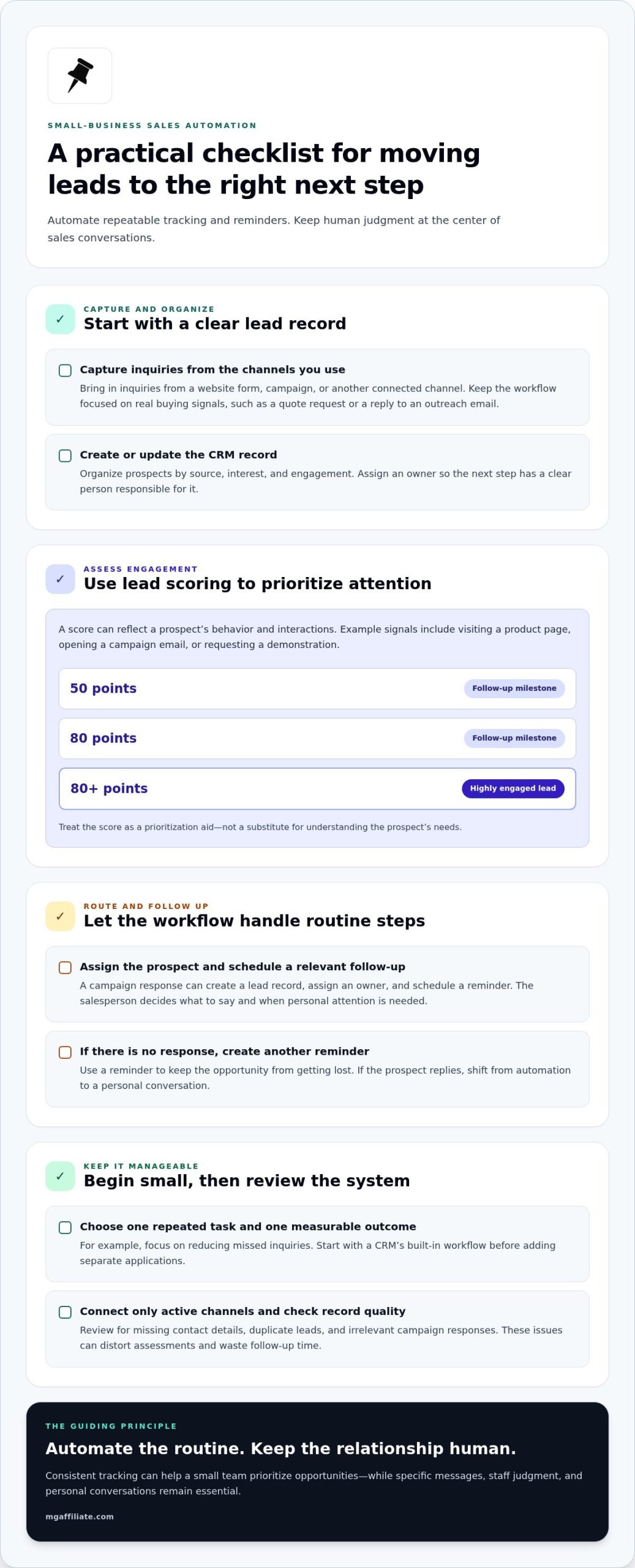
Sales automation uses software to handle repeatable steps in prospecting, lead tracking, and follow-up. For a small business, automating the sales process means setting rules that move each prospect toward an appropriate next action. A campaign response can create a lead record, assign an owner, and schedule a reminder. The salesperson still decides what to say and when a conversation needs personal attention.
How much do small-business CRM and sales automation tools cost? The final cost depends on the features, number of users, and connected tools a business chooses.
Automation can support prospecting by collecting inquiries from a website form, campaign, or other connected channel. It can then organize prospects by source, interest, and engagement, giving the owner a clearer view of which campaigns generate relevant opportunities. Start with criteria tied to your actual sales process, such as a quote request or reply to an outreach email. That keeps the workflow focused on meaningful buying signals rather than a large contact list.
Lead scoring ranks prospects according to their behavior and interactions with the brand. A business might assign points when someone visits a product page, opens a campaign email, or requests a demonstration. The system can then separate cold leads from engaged prospects and prompt a timely follow-up. A guide example uses 80+ points as a threshold for identifying a highly engaged lead, while follow-ups can be scheduled at 50- and 80-point milestones. Treat the score as a prioritization aid, not a substitute for understanding the prospect’s needs.
What is a simple sales automation workflow for a small business? Capture an inquiry, create or update its CRM record, assess its engagement, assign a salesperson, and schedule a relevant follow-up. If the prospect doesn’t respond, the system can create another reminder. A reply should prompt a personal conversation.
To implement automation on a limited budget, begin with one repeated task and one measurable outcome, such as fewer missed inquiries. Use a CRM’s built-in workflow before adding separate applications, and connect only the channels your team actively uses. Review records regularly: missing contact details, duplicate leads, or irrelevant campaign responses can distort assessments and waste follow-up time.
Sales productivity improves when automation handles routine tracking consistently, not when every interaction becomes a template. Keep prospect messages specific, let staff correct inaccurate records, and review which lead sources produce meaningful conversations. This practical approach helps a small team generate and prioritize opportunities without losing the judgment that turns a prospect into a customer.
2. CRM, analytics, email, and social media tools
A CRM gives your team one place to track customer relationships, conversations, and next steps. Connect website forms and social media inquiries to the same records, so a prospect’s email response doesn’t disappear in a separate inbox. Add fields for source, product interest, and last contact. When automating the sales process for a small business, these details help tailor outreach and show which campaigns generate meaningful conversations.
Email automation tools can send a timely follow-up after a quote request, event registration, or product inquiry. Start with a reusable template, then personalize its greeting, relevant product, and next step using the prospect’s CRM details. Generative AI can draft a first version, but a salesperson should edit it for accuracy and a natural voice. A template provides consistency; personal context keeps the relationship from feeling automated.
Build an email workflow around customer actions rather than a fixed series of generic messages. For example, send a requested product guide promptly, create a reminder if the prospect hasn’t replied, and pause promotional emails after a purchase. Use campaign automation to group subscribers by interest or previous purchase, then send relevant updates. Review replies and unsubscribes alongside opens, so you’re not judging a campaign by one measure alone.
Analytics tools turn CRM and campaign activity into useful comparisons. Track which sources bring qualified inquiries, which emails prompt replies, and where prospects stop engaging. If social posts create clicks but few conversations, adjust the offer or landing page before increasing campaign volume. Keep definitions consistent: a click isn’t the same as a sales-ready prospect, and a sent email isn’t proof of a strong relationship.
How can sales automation integrate with email, calendars, invoicing, and ecommerce tools? Connect the CRM to supported email, calendar, invoicing, and ecommerce systems through built-in integrations or APIs. Then configure workflows to create meeting events, sync order details, populate invoice information, and update customer records when a sale is completed.
Start with one connected workflow, such as a website order updating the CRM and triggering a receipt email. Test the customer record, invoice details, and calendar handoff before expanding to other campaigns. Limit access to sensitive sales data, and keep fields and ownership rules clear. Otherwise, duplicate records or conflicting updates can undermine the time saved by automation.
Make the system manageable for the people using it. Document what triggers each email, who handles replies, and when automation should stop. For instance, a customer’s question should route to a person instead of prompting another promotional message. As you refine automating the sales process for a small business, strengthen your offer alongside your systems with sales offer strategies.
3. Automated customer support and appointment scheduling
Automated support can answer common questions, collect details, and route complex requests to a person. AI chatbots can respond to leads 24 hours a day, seven days a week, helping capture inquiries outside business hours. Set clear boundaries: a bot can share basic product information, while a salesperson handles unusual requests, objections, or sensitive concerns. This keeps repetitive tasks moving without treating every customer interaction as identical.
Start with the questions customers ask most often. For example, a support workflow can ask what a visitor needs, save the response in the CRM, and create a ticket for a staff member when the issue needs attention. Track whether each ticket is open, assigned, or resolved. That record helps the team see which requests take time and where clearer instructions or product information could prevent repeat questions.
Appointment scheduling can also eliminate back-and-forth messages. A CRM-integrated calendar lets customers book, reschedule, or cancel appointments, with bookings synchronized to the business calendar. Configure available appointment types, meeting details, and confirmation messages. When a prospect changes a time, the updated event should appear in the shared schedule, so staff work from the same information.
Use customer segmentation to make follow-ups relevant. A CRM can group customers by activity, preferences, or purchase history, then trigger different actions for each group. Someone who has bought a product may need setup guidance, while an active prospect may need a sales conversation. These distinctions help protect customer relationships from repetitive messages that ignore a person’s actual status.
AI-powered CRM features can analyze customer interactions and keep records current when connected systems share information. Review the fields being updated, such as contact details, recent purchases, and support history. Accurate records help staff understand the context before replying. They also support more useful customer engagement, instead of requiring a customer to explain the same issue again.
Plan the post-sale handoff before automating it. When a deal closes, pass the customer’s agreed requirements, purchase details, and open questions to the person responsible for onboarding or support. A workflow can assign that owner and create the next task. The sales representative should still communicate any nuance a form or CRM field cannot capture.
Automation can reduce routine work, but it doesn’t remove the need for human attention. Sales representatives spend almost 41% of their time on non-revenue-generating activities, including follow-ups, pipeline management, meeting scheduling, and invoicing. Use support workflows and calendar synchronization to reduce repeated administration, then direct saved attention toward customer questions that require judgment, empathy, or a tailored solution.
4. Automated reporting and sales forecasting
Automated reports turn pipeline activity into a useful picture of sales performance. A small business can track incoming leads, open opportunities, closed deals, and lost sales in one dashboard. The sales team can then spot where prospects stall, which sources produce sales, and which tactics deserve more attention. Reports streamline reviews only when each team member records activity consistently.
Start with a clear forecasting question: which sales are likely to close, and what resources will those deals need? Set consistent pipeline stages, such as inquiry, qualified opportunity, proposal, and closed deal. For each opportunity, record its stage, expected value, next action, and expected close timing. The forecasting tool can summarize those records, while the salesperson updates them after customer conversations.
Pipeline management makes the forecast useful for planning. If several opportunities remain at the proposal stage, review their next steps and identify where follow-up is needed. If the sales team has a strong flow of inquiries but few qualified opportunities, examine lead sources and qualification criteria. A report should show the underlying activity, not just a headline estimate, so owners can act on the cause.
Use reports to compare outcomes across campaigns, products, or customer groups. For example, a business might find that referrals generate fewer inquiries than a campaign, but more closed deals. That difference can guide resource allocation, such as giving more attention to referral relationships or revising campaign messaging. Sales automation can also analyze activity to reveal successful tactics and messages worth repeating.
Forecasts depend on trustworthy data. 98% of sales leaders emphasize the need for trustworthy data, so define what each pipeline stage means and update records when deals change. Avoid counting an old estimate as current simply because it remains in the CRM. A review process that flags missing next actions, outdated close dates, and duplicate opportunities makes reports more dependable.
Build a practical review rhythm around the decisions your business makes. Before a sales meeting, generate a report showing new opportunities, stalled deals, and completed sales. During the discussion, assign an owner and next action to each opportunity that needs attention. Afterward, update the CRM so the next report reflects those decisions instead of repeating unresolved items.
Keep the first dashboard focused. Track a small set of measures tied to your goals, such as qualified opportunities, conversion between pipeline stages, and sales by source. Add measures only when they answer a real planning question. A clean report helps a small business choose where to focus effort, while a crowded dashboard can hide useful signals among unnecessary metrics.
5. Manual versus automated sales processes
Manual selling gives a salesperson control over timing, tone, and customer judgment. But recording every interaction, remembering each follow-up, and updating the pipeline can consume time. Salesforce research cited in the article’s research reports sales representatives spend 28-29% of their working time actually selling. Automation shifts repeatable steps to software, while people handle decisions that depend on context and trust.
Which sales process steps should a small business automate first? Start with repetitive, time-sensitive tasks: capturing inquiries, logging interactions, sending routine follow-up reminders, and updating deal records. These steps are easy to define and help prevent missed leads, while leaving tailored advice and negotiations to people.
The difference is consistency. A manual process relies on someone remembering to send an email after a quote or record a call in the CRM. A workflow can create the reminder as soon as the quote is sent, then update the record when the prospect responds. That reduces forgotten admin, but staff still need to review replies and choose the right next step.
Automation can also make marketing automation more responsive. For example, a campaign can send a product guide after a prospect requests information, then stop promotional messages when the person buys. Software can handle the trigger and record the action. A salesperson can step in when a prospect asks about a specific need, keeping engagement useful rather than mechanical.
There are limits. Sales automation can handle more than 30% of sales-related activities and tasks, according to McKinsey research. That does not mean it can replace the relationship-building, negotiation, or judgment involved in every sale. A customer with an unusual requirement may need a conversation, not another automated email. Businesses should keep a clear route from automated touchpoints to human support.
Compare the approaches by tracking outcomes for the same process. Record missed follow-ups, time spent on administration, response quality, and movement from inquiry to sale. Automated tasks can run on schedule, while manual work can adapt to a customer’s tone or changing priorities. Review these measures together, because speed alone doesn’t show whether the customer experience improved.
Automation can save an average of 114 hours per employee each year through AI-powered processes. Use that potential to create more space for customer conversations, not simply to send more messages. Choose one recurring task, document how it works manually, automate its predictable steps, and review the results with your team. To build stronger sales habits alongside your systems, explore practical sales strategies.
MG Affiliate: BOSS Moves Book
BOSS Moves Book from MG Affiliate is a natural next step if you’re ready to pair sales systems with purposeful business action. Automation can organize repetitive work, but business owners still choose what to offer, how to communicate value, and which opportunities deserve attention. Use the ideas in this article to identify one process to improve, then consider whether a business-focused book supports your next steps.
Turn insight into action: clarify the offer, make the next customer interaction useful, and keep refining your process. If you’re exploring resources for your business journey, MG Affiliate also offers From Trash Man to Cash Man Book, The B.E.S.T. Wealth Network, and Click and Sell Almost Anything.
Visit mgaffiliate.com to explore MG Affiliate’s offerings.
Make Your Next Sales Move With Intention
Your next step doesn’t need to be a full system overhaul. Choose one sales habit to strengthen, decide what a useful customer interaction should look like, and build your tools around that standard. As you refine automating the sales process for a small business, keep the goal clear: create room for thoughtful selling, not simply more activity.
If you’re ready to develop your approach to making offers, MG Affiliate offers the Make More Offers Challenge – General Admission and the Make More Offers Challenge – VIP Experience. BOSS Moves Book is another option for business-minded readers looking for inspiration as they shape their next steps. Choose the resource that fits the work you want to do now.
Contact MG Affiliate to explore these offerings and decide what supports your next move. Keep building with focus, learn from each customer interaction, and take the next step with confidence.
Frequently Asked Questions
What is sales automation?
Sales automation uses software to perform repeatable actions within a sales process. For example, a CRM can create a task when a prospect downloads a product guide, then attach the activity to that contact’s record. Staff can use that history to prepare for a conversation instead of searching separate inboxes. The aim is a more organized process, with people still responsible for decisions that need judgment or personal attention.
What are the benefits?
Sales automation can make routine work more consistent and give business owners clearer records of customer activity. A small retailer, for example, could automatically record an online inquiry and alert the right employee, reducing the chance that the request gets overlooked. Organized records also make it easier to identify patterns, such as recurring questions that could improve product descriptions or sales materials.
What is small business automation?
Small business automation means using software to handle recurring tasks across business operations, not only sales. A company might connect an online order to inventory records, send a payment confirmation, and create a bookkeeping entry. The owner sets the rules and reviews exceptions, such as an order with incomplete details. Start with a process that follows clear steps and takes staff time without requiring a new decision each time.
Which CRM and sales automation tools are best for small businesses?
The best fit is a system your team can use consistently and connect to its existing workflow. Compare tools based on contact records, pipeline visibility, email integration, reporting, user access, and how easily staff can export or correct data. A business with a small sales team may prefer a CRM with built-in email and task features over several separate platforms. Test the system with real customer scenarios before migrating every record.
How can a small business automate lead capture, qualification, and follow-up?
Connect each lead source, such as a contact form or event registration, to a CRM record with its source and inquiry details. Define qualification criteria that reflect your offer, then route promising inquiries to the appropriate person. Set a follow-up task based on the lead’s action, and stop the sequence when a person replies or opts out. Review sample records to catch missing details and inaccurate routing.
What sales tasks should remain human-led instead of automated?
Keep conversations human-led when customers need tailored advice, negotiation, or help with a complaint. A software supplier, for example, should have a salesperson discuss unusual integration needs instead of sending a standard product sequence. People should also review automated messages before sending them in sensitive situations. Use software to prepare context and manage reminders, then let a person decide how to respond and build trust.
What are the risks and privacy rules for sales automation in the United States?
Key risks include exposing customer information, sending irrelevant messages, and relying on inaccurate records. In the United States, privacy obligations can depend on the information collected, the communication channel, and the locations involved. Limit access to customer data, collect only what the workflow needs, document where records are stored, and provide a clear way to manage marketing preferences. Review vendor security and data-handling practices before connecting systems.
How can a small business measure ROI and results from sales automation?
Measure results against a baseline recorded before the workflow changes. Compare the time spent on a task, completed follow-ups, qualified opportunities, and sales outcomes over a consistent review period. The ROI formula is net income divided by cost of investment, multiplied by 100%. Include setup, software, and staff time in the investment calculation, then assess whether the change improved the process enough to justify maintaining it.
Leave a Reply