

What if AI could help you get past the blank page without taking over the thinking that makes a proposal persuasive? Starting from scratch takes time, and a polished draft can still sound generic or include claims you can’t support. The key to how to use AI for business proposal writing is to let it speed up the work while you stay in control of the strategy, evidence, and final voice.
This guide walks through a practical workflow, from preparing a brief to reviewing the finished draft. You’ll learn how to give AI useful context, shape a tailored proposal, compare tools, and improve clarity without handing over important business decisions.
You’ll also learn where AI can help most and what to check before sending your proposal. The goal isn’t simply to write faster. It’s to make your value clear, keep every claim accurate, and give each prospect a proposal that reflects their needs.
Key Takeaways
- Learn how to use AI for business proposal writing while keeping strategy and final decisions in your hands.
- Start with verified prospect priorities, offer details, scope, and proof to give AI a useful foundation.
- Choose an AI tool based on your workflow needs, including reusable content, collaboration, and formatting.
- Catch plausible but unsupported claims by checking facts, tailoring language, and reviewing every commitment.
- Make your proposal more relevant by clarifying the value of your offer before you draft.
How AI Fits into Business Proposal Writing, and Where It Does Not
AI-assisted proposal writing means using an AI system to organize, draft, and refine information you provide. It can turn meeting notes into a clear outline or reshape approved service details into reader-friendly language. For a foundational overview of the technology behind these tools, see What is Artificial Intelligence? The practical distinction is simple: AI can help express your thinking, but it can’t replace the judgment behind it.
AI assistance creates or improves proposal content from human-provided inputs; it does not approve the proposal, validate its claims, or decide whether the offer is right for the prospect. Keep that distinction in mind: fluent writing can sound certain even when its details are incomplete or wrong.
A business proposal typically presents a recommended solution, its scope, value, and next steps for a specific prospect. It isn’t automatically the same as an RFP response, which addresses a buyer’s formal request and requirements. A quote focuses on price and defined work; a pitch introduces or sells an idea; an informal sales email is usually shorter and less structured. These formats may overlap, but each has a different job. Choose the format based on what the buyer needs to decide.
Which parts of a business proposal can AI help draft?
AI can organize supplied notes into a useful structure, clarify dense wording, and adapt tone for a specific audience. Give it source material and a defined task, such as converting approved discovery notes into an executive summary, rewriting a scope description in plain language, or listing follow-up questions about missing requirements. The quality of the draft depends on the relevance and accuracy of what you provide. Vague inputs invite generic output.
Keep the tool focused on expression and organization. For example, ask it to summarize the prospect’s stated priorities using only the notes provided, then flag gaps rather than filling them with assumptions. It can suggest several ways to explain a benefit, but you decide which version reflects the actual offer and the prospect’s situation.
What should remain a human decision?
You own the strategic choices: whether the prospect is a good fit, what solution to recommend, what work is in scope, and what evidence supports the offer. You also decide the terms. Pricing, delivery timelines, commitments, and capability claims must come from approved facts, not an AI-generated guess. If a detail is uncertain, leave it out of the draft or resolve it before making a promise.
- Client fit: Decide whether your offer addresses the prospect’s real priorities.
- Scope and terms: Confirm what’s included and what you’re prepared to commit to.
- Evidence: Support factual claims with information you can stand behind.
- Recommendation: Choose the approach that best serves the prospect and your business.
Before sending, read the proposal as both its author and its recipient. Does it describe the right problem? Is every claim supported? Is the next step clear? A polished draft is only a starting point. Knowing how to use AI for business proposal writing means putting it to work on the writing while keeping accuracy, fit, and persuasion in human hands.
How to Use AI for Business Proposal Writing: A Step-by-Step Workflow
A useful proposal draft starts before you open an AI tool. Define the decision your proposal should help the prospect make, then give the tool reliable source material and clear boundaries. That’s the practical approach to how to use AI for business proposal writing: guide each step, review the result, and keep the final call in your hands.
Prepare a useful proposal brief before prompting
Summarize the prospect’s problem, desired outcome, intended audience, and decision criteria. Add verified deliverables, exclusions, supporting evidence, and approved business claims. Separate known information from gaps: label missing details as questions, not assumptions. This brief gives AI useful context and gives you a reference for checking whether the draft fits the actual opportunity.
Prompt AI to create and refine a first draft
Ask for an outline before full prose. Specify the audience, tone, length, section order, and source material. Then revise one issue at a time, such as making benefits clearer or simplifying a technical explanation. Specific inputs make AI drafts more relevant and easier to review. Avoid asking for a complete, persuasive proposal from a vague one-line prompt.
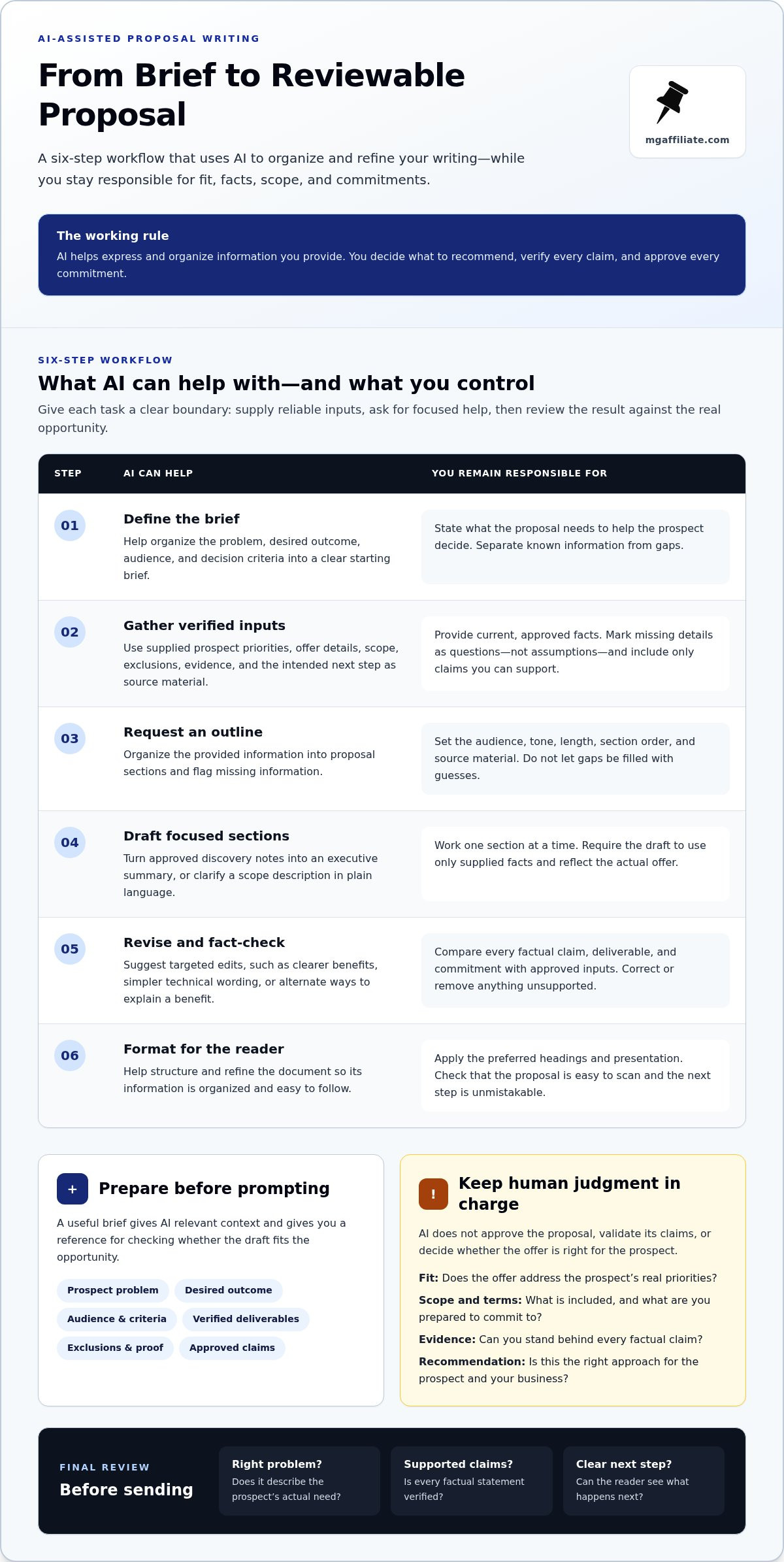
Use this six-step workflow to move from brief to a reviewable document:
- Define the brief. State the prospect’s problem, desired outcome, audience, and decision criteria. Be clear about what the proposal needs to help them decide.
- Gather verified inputs. Collect prospect priorities, approved offer details, scope, exclusions, proof, and the desired next step. Use current source material, not remembered or assumed details.
- Request an outline. Ask AI to organize the supplied information into proposal sections. Tell it to identify missing information instead of filling gaps.
- Draft in focused tasks. Have AI write one section at a time, such as the executive summary or scope description. Ask it to use only the facts provided.
- Revise and fact-check. Request targeted edits, then compare every factual claim, deliverable, and commitment with your approved inputs. Correct or remove anything unsupported.
- Format for the reader. Apply your preferred document structure, headings, and presentation. Check that the proposal is easy to scan and that the next step is unmistakable.
Try this prompt template. Replace each bracketed item with your own information:
“Create a proposal outline for [audience] based only on the source material below. The prospect’s priorities are [verified priorities]. The approved offer and scope are [details and exclusions]. Relevant proof is [evidence]. The desired next step is [action]. Use a [tone] tone and organize the outline into [sections]. Do not add facts, prices, timelines, deliverables, or capability claims that aren’t in the source. List every missing detail as a question for me. Source material: [paste approved notes].”
Once the outline is accurate, ask for a first draft. Refine it with precise follow-ups: “Make this benefit more concrete using only the supplied evidence” or “Rewrite this paragraph in simpler language without changing its meaning.” If you’re still shaping the offer itself, the Make More Offers Challenge is an educational resource for entrepreneurs developing their offers.
How to Choose an AI Tool for Business Proposal Writing
The right tool is the one that fits the work you actually do, not the one with the longest feature list. A solo business owner writing an occasional, straightforward proposal may need only a general-purpose AI assistant and a document editor. A team responding repeatedly to formal RFPs may benefit from specialized content libraries and collaboration features. Start with proposal frequency, complexity, team size, and the workflow you already use.
When is a general-purpose AI assistant enough?
For occasional, low-complexity proposals, a general-purpose assistant can help outline a document, rewrite supplied notes, or draft a simple section. This lightweight approach avoids adding a separate platform to your process. You’ll need to supply and manage approved source material yourself, then check the draft manually. Don’t assume the tool includes proposal-specific safeguards or knows which business claims are approved.
When might proposal-specific or design-focused tools help?
Specialized proposal or RFP platforms may suit teams that answer similar questions often, reuse approved content, and need shared review workflows. Design-focused tools can help arrange layouts and visuals, but presentation doesn’t establish whether the offer is accurate or strategically sound. Before adopting either type, assess its fit with your existing process, data handling, collaboration needs, and review requirements.
| Tool type | Workflow fit | Reusable source content | Collaboration | Formatting | Review needs |
|---|---|---|---|---|---|
| General-purpose AI assistant | Outlines, rewrites, and simple drafts | Usually supplied by the user | Depends on the tool and workflow | Draft text; final layout often handled elsewhere | Check sources and every claim manually |
| Proposal or RFP platform | Repeated, structured responses | May support organized answer libraries | May include shared workflows | May support proposal assembly | Review reused content for current fit and accuracy |
| Design-focused tool | Visual presentation and layout | Content may need to be imported or entered | May support shared design work | Focuses on appearance and visual structure | Check the business content separately |
Use the table as a starting point, not a promise about any specific product. Features vary, and a vendor’s product description is not the same as a verified result. Separate what you can demonstrate in a trial or workflow test from promotional claims, customer testimonials, and performance figures. Each may provide context, but none proves that a tool will improve your proposals in your setting.
Before committing, test one representative proposal. Can the tool use your approved material without making source control harder? Can the people involved review changes clearly? Does the final document fit your current process? Consider how to use AI for business proposal writing within the workflow you already have, then choose the simplest option that meets your needs. Keep human review in place, whatever tool you select.
How to Make AI-Written Proposals Accurate, Personal, and Trustworthy
A proposal can read smoothly and still misstate a detail that matters. AI may produce plausible claims that aren’t supported by your source material, so treat every factual statement as something to verify, not something to trust because it sounds polished. Before sharing prospect or company information with a tool, follow its data policies and your company’s rules for sensitive information.
No proposal claim is ready until its source and owner are clear. This review rule keeps the draft accountable: you should be able to identify where each important detail came from and who approved it.
How do you catch errors and unsupported claims?
Review the draft against approved sources, not your memory of what the AI intended. Check names, figures, dates, deliverables, qualifications, and any evidence cited. If a detail is missing, use a visible placeholder such as “[Confirm delivery date]” and assign someone to resolve it. Don’t let an open question quietly become a promise.
- Names and figures: Match spellings, quantities, and financial details to the source record.
- Scope and capability: Confirm each deliverable and qualification is accurate and approved.
- Evidence: Make sure examples, results, and supporting claims have a source you can stand behind.
- Commitments: Ask the responsible decision-maker to review legal, financial, and operational terms before approval.
For example, if the draft says a project includes a particular deliverable but your brief doesn’t mention it, don’t assume the AI inferred it correctly. Remove the statement or leave it flagged as a question until the right person resolves it. Apply the same discipline to dates, pricing, guarantees, and claims about what your business can do.
How do you preserve a personal, prospect-specific voice?
Personalization means connecting the offer to what the prospect actually said, not adding their name to generic copy. Replace broad benefits with details tied to their stated priorities. Then edit out repetitive, exaggerated, or impersonal language, and check that the tone fits both the relationship and the real offer. Keep persuasive language grounded in evidence.
Try a final read-through with three questions:
- Does this proposal address the prospect’s stated needs, using details they would recognize?
- Does each benefit explain value without promising an unsupported result?
- Does the language sound like your business and accurately represent the offer?
If a sentence could be sent unchanged to any prospect, make it more specific or remove it. That’s how to use AI for business proposal writing without letting fluent copy replace genuine relevance. Strong proposals communicate a valuable offer clearly, and the Make More Offers Challenge can help entrepreneurs develop their offers.
Turn a Stronger Proposal into a Clearer Business Offer
A proposal is more than a document to polish. It shows a prospect what problem you can address, what value your offer provides, why they can trust it, and what decision comes next. AI can help organize and express that value, but it can’t make an unclear offer compelling or guarantee acceptance or revenue. The strength comes from the fit between the prospect’s priorities and what you’re genuinely prepared to deliver.
What should you improve before sending the proposal?
Take one proposal and run a focused final review. Check that it speaks to the prospect’s stated priorities, makes the decision they need to make clear, and presents a consistent path from problem to solution. Look for gaps between the described scope, supporting proof, assumptions, and proposed next step. If the recommendation depends on an assumption, make it visible instead of burying it in confident language.
Use this short launch checklist:
- Select one proposal to improve, rather than trying to overhaul every document at once.
- Gather approved facts about the prospect, offer, scope, and evidence that supports your claims.
- Draft and refine the proposal so its value and requested decision are easy to understand.
- Review for consistency across scope, proof, assumptions, and next steps before sending.
- Capture feedback from reviewers and the prospect, then use relevant lessons to improve future briefs and prompts.
Feedback is useful even when it doesn’t lead to a yes. Note where readers needed clarification, which evidence strengthened the case, or whether the recommended next step was clear. Use those observations to improve the proposal process, not to assume AI can predict the outcome.
How can offer clarity strengthen your proposal?
A defined offer gives the proposal something specific to communicate: the problem addressed, the value delivered, and the evidence that makes the recommendation credible. If those pieces are still fuzzy, better wording won’t resolve the underlying issue. Clarify what makes the offer relevant first, then use AI to present that value in a structure the prospect can follow.
For more context on developing an offer, explore the Make More Offers Challenge, an educational business intensive focused on crafting offers. Pair that work with a careful proposal review: make sure the solution matches the prospect’s needs, the proof supports the claims, and the next step is practical and clear. That’s a grounded way to apply how to use AI for business proposal writing, with AI supporting the communication rather than dictating the business decision.
Entrepreneurs looking to develop clearer offers can explore the Make More Offers Challenge. Explore business-offer education through MG Affiliate as a next step in strengthening the value your proposals communicate.
Put Your Next Proposal to Work
Choose one upcoming proposal and use it to sharpen how you communicate your offer. Pay attention to the prospect’s questions and the parts they respond to. That feedback can help you clarify your value and improve future proposals. The real advantage of learning how to use AI for business proposal writing isn’t just producing a draft sooner; it’s building a repeatable practice that makes your business thinking clearer with every opportunity.
If you’re ready to develop the offer behind your proposals, the Make More Offers Challenge is a recurring five-day business intensive that helps entrepreneurs craft offers. General Admission and VIP Experience are registration options. It’s an educational next step, not AI writing software.
Explore the Make More Offers Challenge and keep building offers you can communicate with clarity and confidence. Your next proposal is a chance to put that progress into action.
Frequently Asked Questions
Can AI write a complete business proposal?
AI can generate a full proposal draft, but it can’t independently know whether your recommendation fits the prospect or whether every commitment is authorized. Treat a complete draft as a working document, not a finished offer. For example, have AI organize approved notes into sections, then ask the people responsible for delivery and pricing to review the parts they own before the proposal goes out.
What information should I give AI to write a business proposal?
Give it enough context to understand the prospect and the offer: the business problem, desired outcome, audience, decision criteria, relevant approved service details, and any evidence you can use. You can also specify the proposal’s purpose and preferred format. If you’re working from a discovery call, provide a cleaned-up summary rather than raw notes that include unrelated or sensitive discussion.
How do I stop AI from making up facts in a proposal?
You can reduce invented details by instructing AI to use only the source material you provide and to identify missing information as questions. Then compare the draft against those sources. For instance, if a paragraph mentions a qualification, client result, or delivery detail that isn’t in your approved records, remove it or verify it with its owner. A confident tone isn’t evidence.
Is it safe to put client information into an AI proposal writer?
That depends on the tool’s data policies and your company’s rules. Before entering client information, review how the tool handles submitted content and whether its terms fit your organization’s requirements. If the rules aren’t clear, avoid sharing confidential details and use anonymized descriptions instead. Replace client names with labels such as “Prospect A,” and remove account numbers or private commercial terms from working prompts.
Should I use ChatGPT or specialized proposal software?
Use a general assistant such as ChatGPT for flexible writing tasks, such as turning an approved outline into a readable draft. Specialized proposal software may better suit recurring formal responses that rely on shared content libraries or team review. Decide based on how often you prepare proposals and how your team works. Test a representative task, then compare editing effort and workflow fit.
Can AI personalize a proposal for each prospect?
Yes, AI can help adapt a draft when you provide reliable details about each prospect’s priorities, context, and desired outcome. Ask it to explain how a particular part of your offer relates to one stated need, rather than simply inserting the prospect’s name. Review the result for accuracy and tone. Personalization should reflect a real understanding of the buyer, not a collection of swapped-in details.
Leave a Reply