

A strong sales follow-up email moves the buyer conversation forward: it recalls what you discussed, confirms useful next steps, and gives the buyer a clear reason to respond. AI for drafting sales follow-up emails can turn buyer details, call context, CRM notes, and previous emails into a personalized first draft, which you then review for accuracy and tone.
It’s easy to see why a generic “just checking in” message feels like wasted effort. Use AI to save drafting time without losing the specific details that make a follow-up relevant to the person receiving it.
Learn what a sales follow-up email should accomplish, how to give AI the context it needs, and how to refine its draft before sending. The steps ahead cover personalization, useful source material, and a practical review process to keep your message focused and human.
Key Takeaways
- Review each AI-drafted message for accuracy, relevance, and a clear next step before sending it to a buyer.
- Build a repeatable follow-up workflow that keeps outreach timely while prioritizing relevant messages over repeated contact.
- Use buyer details and call context to explain why you’re reaching out, rather than relying on a generic check-in.
- Bring together useful details from transcripts, CRM notes, and email threads to give AI stronger context for its draft.
What Is a Sales Follow-Up Email?
- Connect the message to the conversation. A sales follow-up email continues a buyer interaction with a useful recap, answer, resource, or next step. For example, after a product discussion, confirm the buyer’s stated need and send the relevant information. AI for drafting sales follow-up emails can turn call notes into a first draft, but the salesperson owns the final message.
- Use AI as a drafting assistant. Provide the buyer’s role, goal, concerns, and agreed action. Ask for a concise email that reflects those details, not a generic pitch. AI-generated call summaries can surface commitments and open questions, while a follow-up draft can organize them into a message. Neither can reliably supply context that wasn’t provided.
- Check the summary against the source. Treat an AI call summary as a 90% complete first draft, then compare it with the transcript or your notes. Summary accuracy has improved dramatically over the last two years, but errors can still change a buyer’s meaning. Confirm names, product details, objections, dates, and ownership before using the summary in your workflow.
- Review every draft before sending. Check that the message answers the buyer’s actual question and reflects the agreed next step. Remove unsupported claims, incorrect promises, and details belonging to another account. Read the subject line and body aloud; replace stiff phrasing with language you would use in a real conversation. Keep the pipeline record consistent with the email.
- Extend useful context into sales rooms. When a shared sales room supports the deal, use an approved AI draft to summarize the discussion and point buyers toward relevant materials. Verify every link, claim, and action before sharing. AI can organize information and suggest wording; it cannot decide which resource fits the buyer’s priorities without accurate human-provided context.
- Use specific prompts and measure outcomes. Ask AI to write for a named buyer persona, include the call’s key points, answer one concern, and end with one clear next step. For U.S. commercial follow-ups, CAN-SPAM is a relevant law; AI drafting does not remove the need to consider applicable email rules. To assess replies or conversions, compare results across similar audiences and messages rather than assuming AI improves them.
Automating follow-ups for high-volume outbound sales
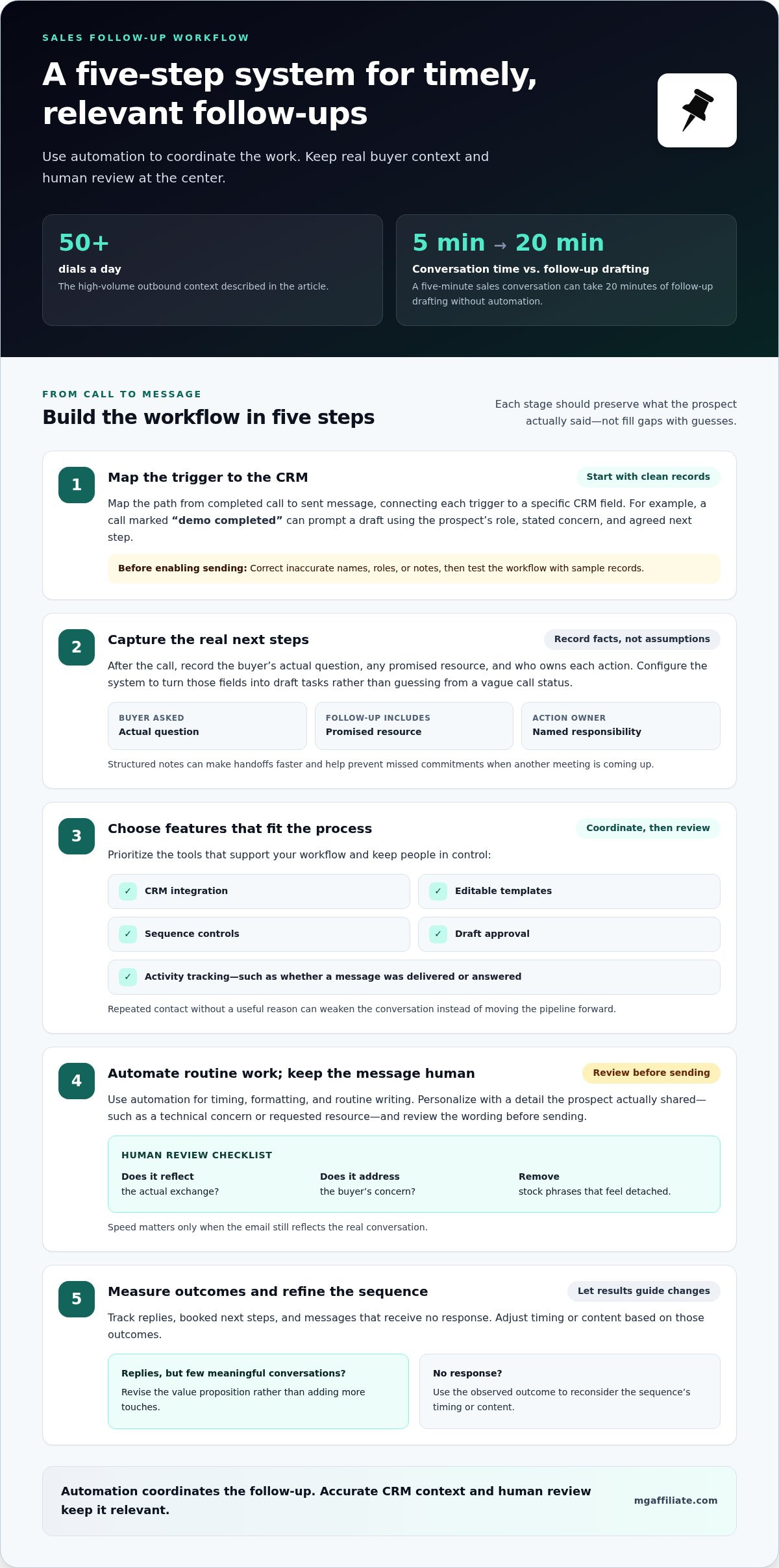
For representatives making 50+ dials a day, automation can coordinate timely follow-ups without turning every prospect interaction into the same message. Build the workflow around clean CRM data, relevant triggers, and human review.
-
Set Up the Automated Workflow
Map the steps from completed call to sent message, then connect each trigger to a specific CRM field. For example, a call marked “demo completed” can prompt a draft using the prospect’s role, stated concern, and agreed next step. Clean contact records first: inaccurate names, roles, or notes can lead to incorrect personalization. Test the workflow with sample records before enabling sending.
- Capture next steps in the CRM. After a call, record the buyer’s actual question, any promised resource, and who owns each action. Configure the system to turn those fields into draft tasks rather than guessing from a vague call status. When a representative has little time before another meeting, structured notes make the handoff faster and help prevent missed commitments.
- Choose features around the workflow. Prioritize CRM integration, editable templates, sequence controls, draft approval, and activity tracking. These tools can help teams coordinate sending and see whether a message was delivered or answered. Keep automated cold outreach relevant and consistent: repeated contact without a useful reason can weaken the conversation instead of moving the pipeline forward.
-
Balance Automation With Authenticity
Personalize each message with a detail the prospect actually shared, such as a technical concern or requested resource. Use automation for timing, formatting, and routine writing, then review the wording before sending. A five-minute sales conversation can take 20 minutes of follow-up drafting without automation, but speed matters only if the email reflects the actual exchange. Remove stock phrases that sound detached from the buyer’s concern.
- Measure and refine the sequence. Track replies, booked next steps, and messages that receive no response, then adjust the timing or content based on those outcomes. If a sequence gets replies but few meaningful conversations, revise its value proposition rather than adding more touches. Strengthen the offer behind your outreach with ideas for making more offers.
Personalizing emails with buyer and call context
Make each message reflect a real buyer detail, not a guessed preference. A CRM record, company website, and meeting notes can help AI shape relevant outreach.
-
Use Lead and Company Data
Give the assistant verified lead and company details, such as the buyer’s role, business priorities, and a relevant product feature. Ask it to connect one detail to the reason for your outreach. Then check each statement against the CRM record or company information. Don’t present an inferred need as fact or include personal details that don’t help the conversation.
- Use lead scoring to guide relevance. Apply your existing lead-scoring criteria to decide which prospect needs a tailored message first. A high score can help prioritize outreach, but it shouldn’t dictate the email’s claims or tone. For example, if a record shows a recent product inquiry, ask AI to address it directly. Don’t mistake a score for buyer intent that the record doesn’t support.
-
Personalize From Call Details
Use the meeting record to identify the buyer’s actual concern, requested information, and agreed action. Prompt AI to include those points in a concise follow-up, then compare the draft with your notes. If a prospect raised an implementation question, answer it or state the next step. Don’t let automated writing turn an unresolved concern into a promised solution.
- Adapt templates for cold outreach. Start with a shared template for structure, then tailor the opening and reason for contacting each prospect. A useful prompt can request a short email based on a verified company detail and a relevant feature. Review every edit for accuracy. If the message could be sent unchanged to another company, add a concrete connection or rewrite it.
- Keep personalization focused. Choose one or two details that help the buyer understand why the message matters now. For example, connect a question from the call to a resource or specific next step instead of listing every CRM field. This keeps the email readable and gives AI a clear task. Compare the finished draft with the source record before sending.
AI context from call transcripts, CRM notes, and emails
Give an AI tool relevant evidence from several sources, not just an isolated note. A clear integration workflow helps your sales team turn scattered context into a personalized draft.
- Collect the right source material. Pull the relevant call transcript, CRM data, and email thread for one prospect. A transcript may contain 5,000 words, so identify the sections covering goals, objections, and agreed actions. Give the AI tools those excerpts alongside the account record. This helps the assistant distinguish buyer-specific details from general discussion.
- Label each source and its timing. Tell the tool which details came from the latest call, older CRM notes, or an earlier email. For example, mark a previous feature request as historical if the buyer later changed priorities. This simple structure reduces the chance that outdated context shapes today’s message. Keep the source record available for comparison.
- Ask for evidence-linked drafting. Prompt the tool to draft from supplied facts, identify unresolved questions, and avoid filling gaps with assumptions. Ask it to show which source supports each important claim. Then compare the draft with the transcript and email thread. If the CRM says “security review” but the call transcript says “pricing review,” resolve the mismatch before sending.
- Separate summary from interpretation. Ask AI to list direct buyer statements separately from inferred themes. A transcript might show that a buyer asked about implementation, but it doesn’t prove a purchase decision. Keep that distinction in the CRM data and final email. A technical requirement missed during an enterprise call can jeopardize a deal three months later, so preserve exact requirements.
- Build a repeatable context handoff. Have the sales team use the same source fields and prompt structure for each account. Review integration outputs when records contain conflicting dates, owners, or next steps. Some users report saving around 20 hours per month by spending less time searching for information. To sharpen your offer strategy, explore the MG Affiliate resources.
MG Affiliate: BOSS Moves Book
MG Affiliate’s BOSS Moves Book is a next step for readers who want to keep developing their business thinking beyond sales email workflows. Use the follow-up practices in this article to make your buyer communication clearer; then explore the book as an additional resource for your broader professional growth. It may fit when you’re ready to build on practical sales habits and consider how your decisions support your larger goals. Keep the distinction clear: AI can help organize buyer context and draft messages, while your judgment guides the conversations and business choices that follow. To learn more about BOSS Moves Book, visit MG Affiliate online.
Turn Better Follow-Ups Into Your Next Move
Make your next step deliberate. Use AI for drafting sales follow-up emails as part of a thoughtful sales process, while continuing to build the business skills behind each buyer conversation. The right message can open a door; consistent action helps you move through it.
If you’re ready to explore broader business development resources, MG Affiliate offers the Make More Offers Challenge – General Admission, the Make More Offers Challenge – VIP Experience, and BOSS Moves Book. Choose the resource that aligns with your next goal, whether you’re developing your offer strategy or strengthening your business mindset.
Contact MG Affiliate to discuss your needs, and keep turning each thoughtful conversation into forward momentum.
Frequently Asked Questions
How Do the Top AI Email Tools Stack Up?
AI email tools differ in how they use existing sales information and fit into your team’s workflow. Some generate copy from prompts; others connect drafting to CRM records or campaign management. Compare them using the same test: provide a sample buyer profile and ask for a follow-up addressing one specific need. Judge accuracy, editing effort, and workflow fit, not polished language alone.
Should you include attachments in a follow-up email?
Include an attachment when it directly helps the buyer take the agreed next step. For example, after a pricing discussion, a relevant proposal may be more useful than a general company brochure. Name the file clearly, explain why it’s included, and confirm it’s the correct version. If the buyer requested a link or document-sharing space, use that format instead of adding an unexpected file.
What Features Matter Most in an AI Email Tool?
Prioritize features that let you control inputs, review drafts, and fit the tool into your process. Editable prompts let a sales representative specify the audience, purpose, and tone. A clear preview supports review before sending, while CRM connections can reduce repetitive copying when configured appropriately. Also assess how the tool handles account information and permissions so the sales team can use its records responsibly.
Which AI Tool Is Best for Small Business Lead Follow-Up?
The best fit is a tool that matches your current sales process without adding unnecessary complexity. A small business using a simple CRM may prefer straightforward drafting and easy copy-and-edit controls. A team with established lead stages may value CRM integration and workflow options. Test the tool with a real, non-sensitive example, then compare the draft’s usefulness with the setup it requires.
Why Use AI-Powered Email Workflows?
AI-powered workflows can organize recurring email tasks, such as preparing a draft after a lead changes stages or requests information. They work best when the trigger, recipient, and intended action are clearly defined. For example, a resource request might create a draft that refers to the requested material. Keep a human approval step for unusual cases, account changes, or messages involving important commitments.
What are the best AI tools for drafting sales follow-up emails?
The best tools produce usable drafts from the buyer context you can provide and fit your team’s existing process. There isn’t one universal winner for every sales team. Compare candidate tools using the same prompt, buyer scenario, and success criteria, such as factual accuracy, relevance, and editing effort. Choose a tool that helps representatives write effectively without obscuring their responsibility for the final message.
Leave a Reply